Search++: A work in progress
-
I use the dark mode display for almost all apps and I really like it, so I think we are in agreement :)
You know what they say - join the dark mode, we have cookies… 🍪
On another note, I would like to hear your thoughts as veterans on this forum. I’m working on an AI chat plugin to streamline the use of prompting an LLM into the workflow with N++. I wonder - has anyone done it before? What would be important features to implement?
I would appreciate hearing your thoughts.
Thank you!
-
Hello, @lachlanmax and All,
Well, presently I’m not a modern
C++developer and I rather use the old MicrosoftQbasicor sometimes theGAWKsoftware and, more rarely, the N++PythonScript, in addition to N++ and its plugins, of course !However, I’ve got some documentation on
C/C++. So, I’ll probably learn a lot from scratch but I’m not sure yet if I’ll be able to make improvements to our beloved editor !
So, to my mind, you should get in touch with @Richárd-stockinger and @jw which already developed AI tools for N++. They will surely provide you with valuable advice for your project ! Refer to :
https://github.com/krazal/nppopenai
https://github.com/Qdthon/Notepad-AIPlugin
Best Regards,
guy038
P.S. :
Although you might assume that some of my regex solutions seem to have been created with the help from an
IAengine, I can assure you that it’s only my modest brain that’s at shake when it comes to these resolutions ! -
@guy038
I wasn’t familiar with these projects. Thank you for the tip-off, I have a lot to learn from these. Glad I asked your advice.We don’t know each other too well yet, but from your replies I get the feeling you have been coding for a while now… as a relative n00b I think it’s good to learn coding the nuts-and-bolt way, not just “vibe coding” like everyone is nowadays. (Even though I’m developing an AI plugin, so a bit of a contradiction. But I like to develop plugins that I would use personally, and I don’t use it to “vibe code”. Granted though that some might.)
tl;dr Hard work pays off!
-
Hi, @lachlanmax and All,
I forgot to give you the Community threads of, both, @Richárd-stockinger and @jw :
https://community.notepad-plus-plus.org/topic/24444/new-plugin-nppopenai
https://community.notepad-plus-plus.org/topic/27361/ai-plugin
BR
guy038
-
Hello, @coises and All,
How are you, @coises ? Pretty good, I guess ! I just uploaded a new version of the
ICU.txtfile which simply corrects a few typos.https://drive.google.com/file/d/1_TwEV1oorsoWUUjL97BmptcR4fpNQ98_/view?usp=sharing
First, regarding the bug I mentioned in my two previous posts, I also detect it with native N++ and, for example, the
Find Resultspanel :-
Open the
Finddialog -
Do any kind of search
-
Click on the
Find All in Current Documentbutton
=> A
Search resultspanel opens and displays all the occurrences of the searched stringNow :
-
(1) First, click once, anywhere on the blue
Search resultstitle -
(2) Then, moving your mouse horizontally right to the cross, at the far right, try to close the panel => Nothing happens !
-
(3) Just, move down the mouse within the
Search resultspanel then re-click on thecross=> This time, theSearch resultspanel should close, as expected. -
Re-open the
Search resultspanel, using theF7key -
Repeat the actions, 1, 2 and 3 to trigger again that bug. Sometimes, some tries are necessary to get into the problem !
Remark :
- If, you accidentally double click on the
Search resultstitle bar, this panel will become a floating window. To restore its initial position, simply double-click again on theSearch resultstitle bar
Note that, in the end, this bug does not really matter because I mapped the
Ctrl + Shift + Nshorctut to theSearch...option of your plugin. So, hitting this shortcut twice does close the plugin, anyway !
I thought of an enhancement of your
Search++plugin :Let’s suppose that I want to mark all lines which satisfy the regex below, against the latest change.log file ( release
8.9.6). So :-
We open or select the
change.logfile / tab -
We open the Mark dialog (
Ctrl + M) -
We check the
Bookmark line,Purge for each searchandWrap aroundoptions, ONLY -
MARK
(?i-s)(?:\G|Q).*?T -
We select the
Regular expressionmode -
Finally, we click on the
Mark Allbutton
Two lines only are bookmarked : the very first one and the point
#8ofv8.9.4. However, the total number of occurrences is8Notepad++ v8.9.6 vulnerability fix, regression fixes & bug-fixes: 8. Fix quote escaping causing incorrect JSON syntax highlighting (Lexilla update related).As you can see :
-
For the first line, as we are at the very begining of file, the
\Galternative finds two occurrences -
For the second line, the
Qalternative finds the first occurrence and the\Galternative finds the five remaining occurrences
So, I was wondering if you could alternate the colors, between the present mark color and an other one, in order to easily distinguish these occurrences ?
Now, near the end of your initial
Search++post, you said :I plan to add a Save function that will let you save searches you might want to use again. Of course, once it is possible to save, it has to be possible to delete and rename and edit and organize… I haven’t designed a user interface for any of that yet.
I do support this future enhancement !
Best Regards,
guy038
-
-
So, I was wondering if you could alternate the colors, between the present mark color and an other one, in order to easily distinguish these occurrences ?
I have thought about the possibility of making marks designate individual spans of text rather than running together. It is possible. In fact, you can see it, if you look closely, in the Search++ search results window if you do a Find All with the change log and your regular expression. You might have to zoom to see it, but there are small white spaces between the different matches. The search results window also marks null matches with an upward-pointing chevron below the baseline.
Your idea makes sense. I believe I would have to make it an optional feature, because it is not the way marking ordinarily works in Notepad++. I also have to consider how it impacts search in marked text, though I think that would be straightforward: when marked text is separated in this way, each individual span would be searched independently. (In the current way of marking, each contiguous marked block is searched regardless of whether it came from a single match or multiple matches.) It will take some thinking to make sure what happens when marked text is already present and new marks are added which adjoin or overlap existing marks makes sense.
I do support this future enhancement
As you’ve no doubt noticed, there hasn’t been any progress on Search++ lately. I had hoped that following the point where I made the first public release I would be able to just keep going straight through to a first “stable” release, but my attention has been directed elsewhere for a time. I’ll be back.
Find/replace in files and saving searches are the two main features I want to add before I think I can close in on “stable.” These are both things that I think could cause significant changes in the programming (and maybe the user interface), so I don’t want to try to reach “stable” and then immediately destabilize everything. I’m treating their absence as a blocker.
I think I want to add a couple more options for manipulating marked text (like remove marks from selected text) to the Tools menu, and I have some known problems (like that the search results window can be painfully slow with a lot of matches in a large file, and I don’t think the routine that is supposed to make finding a match scroll so that the match won’t be hidden behind the dialog when it is non-docking works reliably yet). ICU search should either be hidden or be extended to work with most if not all of the same commands as Regex (Boost).
There is still no simple way to access the drop-down menus on the split command buttons by keyboard, and I still don’t have a good idea how to make it both possible and discoverable. I think I need to add Find and Replace commands to the plugin menu so it would be possible to set them as Notepad++ shortcuts, which would make it possible to do sequential find and/or replace while focus remains in the document.
Your suggestion here makes sense, and I need to crawl through this entire topic to see what other ideas and observations I might have forgotten. There was a suggestion in another topic about showing context (lines before and after) in the search results list: I’ll probably look at that when I look at search in files, since both will require significant changes to the way I build the search results list at present.
-
First, regarding the bug I mentioned in my two previous posts, I also detect it with native N++ and, for example, the Find Results panel :
Thank you for that additional information. I had a suspicion this was a Notepad++ behavior not really related to the plugin.
I have not been able to reproduce it. It is possible that it is dependent on some detail of your operating system or drivers.
Since you can reproduce it without any plugin, I suggest adding it as a Notepad++ issue if you think it is worth further investigation. It could be that others will be able to reproduce it, perhaps including someone who can run Notepad++ under debug and close in on what is going wrong.
-
Search++ version 0.6 is available.
The big change in this version is the addition of a Search in Files dialog:
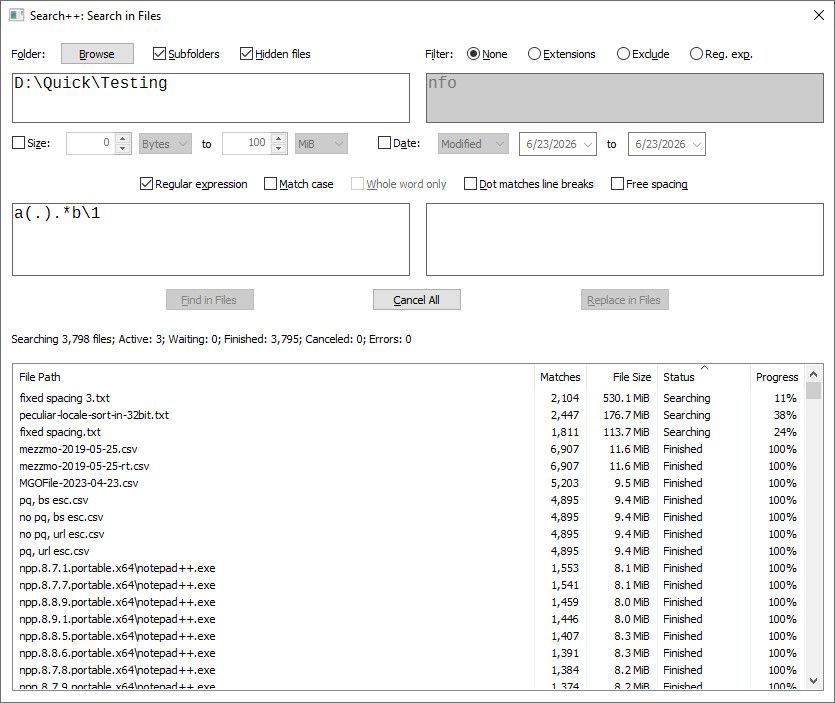
There have been a few small fixes elsewhere — by now I’ve forgotten what they were — but mostly this release is for Find in Files. Adding that led to quite a few changes in code it shares with the existing functions, so unfortunately there could be new bugs in old functions. On the whole, though, handling of the search results list should be improved for all functions that use it.
If you don’t like to read help, at least don’t forget to try right-clicking the text entry boxes and items in the file list.
Replace in Files is planned but not yet implemented.
-
Hello, @coises and All,
First, many thanks for adding the
Find in Filescapability within theSearch++plugin. In addition, this search dialog allows you to filter by date range and/or size and also to choose or exclude some extensions !
Regarding the
Search++ Search in Filesdialog :To my mind, the magic option is the last Filter
Reg. Exp.option. Indeed, for example, from my USB key namedD:, I typed in the text below, in the Filters zone :^890_x64\\.+\.log$|^862_x64\\|^C.*\.txtThen, the search scope would be :
-
All the
.logfiles in the890_x64arborescence ofD: -
All files of the
862_x64folder ofD: -
All the
txtfiles, from the root (D:), whose name starts with a letterC
It’s important to emphasize that the Filters search is always a NON-SENSITIVE search. Thus, given the example above, the search would occur on file
D:\..\...\...\Test.LOGand on fileD:\current.txt. This remark also applies to theExtensionsandExcludeoptions !In order to search in a specific folder, named
Musicof my USB key, I have two possibilities :-
Clic on the
Browsebutton in the Folder zone, select theMusicfolder and choose the optionNonein the Filter zone -
Type in
D:\( the root ) in the Folder zone, choose the FilterReg. Exp.option and type in^Music\\in the dialog
But if you’re looking for any directory of your media, with name
Music, prefer this regex(^|.*\\)Music\\Note that if you type in, for example,
log;iniin the FilterExtensionsoption, you may use, instead, theReg. Exp.option with the regex\.(log|ini)$Now, is there a particular reason for not allowing the
ICUsearch ? For some European people, the search of any text depending of a specific language could be interesting !For example, the different searches, below, would find any file containing
GREEKcharacters :-
All Greek blocks
[[[\p{In_Greek}][\p{In_GreekExt}][\p{In_AncientGreekNumbers}][\p{In_AncientGreekMusic}]]&&[\p{Assigned}]]( = 135 + 233 + 79 +70 = 517 characters ) -
The Greek script
\p{Grek}( = 518 characters ) -
The Greek Extended script
\p{SCX=Grek}( = 531 characters )
Regarding the
Search++ Resultsdialog :-
Would it be possible to add a Purge option, like in the context menu of the N++
Search resultsdialog ? You could use the same labelPurge for every searchor some equivalent ( I do likePurge before each search) -
Although written in your files list, I also noted that the number of scanned files is not reported in the
Search++ Results** dialog, unlike with the N++ **Search results` dialog
For instance, the search of the string
Fiwithin all files of my USB key gives :- Finished; found 34 283 matches in 841 of 1771 files. in the FILE list of Search++ - 34 283 matches in 841 files: Fi, on the FIRST line of the Search++ Results dialog - Search "Fi" (34283 hits in 841 files of 1771 searched) [RegEx: Case], on the FIRST line of the N++ Search ResultsAnd, if possible, it would be best to include the chosen options of the current regex too, like
Regex, Case,...?!To end with, I noticed that, within the N++
Search results, it is possible to easily see all files which has matches, without seeing the matched lines :-
By hitting
Ctrland clicking on⊟, on the first line => The search collapsed after some time and then with a simple click on⊞ -
By using the
Fold Alloption of the Context dialog and then a simple click on⊞of the first line
Although, within the
Search++ Resultsdialog, you can double-click on any file header or on the Search header itself to collapse the lines, I have not been able to get the configuration below, in theSearch+++ Resultspanel :⊞ D:\Micro.txt ⊞ D:\862_x64\npp.8.6.2.portable.x64.7z ⊞ D:\862_x64\autoCompletion\actionscript.xml ... ... ... ⊞ D:\change_896.log ⊞ D:\Word_Frequency.txt
As usual, @coises, these ideas are only suggestions. Do as you like, of course !
Best Regards
guy038
-
-
@guy038 said:
First, many thanks for adding theFind in Filescapability within theSearch++plugin.Thank you for trying it!
It’s important to emphasize that the Filters search is always a NON-SENSITIVE search.
I made it that way by default since file and folder names are not case sensitive in Windows. You can still prefix the expression with
(?-i)to make it case sensitive. I don’t know if the API I use to retrieve file paths from a folder is guaranteed always to return names in the correct case, but it appears that it does.Now, is there a particular reason for not allowing the
ICUsearch ?Just the same as before — allocation of time and effort. ICU is not a “drop-in replacement” for Boost::regex; it would have significantly delayed me being able to release a public version of this had I included ICU search. Since Notepad++ users are already familiar with Boost::regex syntax, and I am more familiar with its programming interface (and so can work with it more quickly than ICU), I have prioritized Boost::regex.
I am not ruling out adding it later. I will say, though, that I plan to study and attempt to incorporate its useful unique features into Boost::regex before spending too much time trying to implement additional ICU search variants of Search++ functions. It remains to be seen whether I can successfully fork Boost::regex and extend/enhance it to make the ICU search option redundant. It definitely helps me that you are making note of ICU features you miss in Boost::regex.
Regarding the
Search++ Resultsdialog :- Would it be possible to add a Purge option, like in the context menu of the N++
Search resultsdialog ? You could use the same labelPurge for every searchor some equivalent ( I do likePurge before each search)
That makes sense and sounds possible. I’ll add it.
- Although written in your files list, I also noted that the number of scanned files is not reported in the
Search++ Results** dialog, unlike with the N++ **Search results` dialog
And, if possible, it would be best to include the chosen options of the current regex too, like
Regex, Case,...?!Agreed. I’ll add that information.
To end with, I noticed that, within the N++
Search results, it is possible to easily see all files which has matches, without seeing the matched lines :-
By hitting
Ctrland clicking on⊟, on the first line => The search collapsed after some time and then with a simple click on⊞ -
By using the
Fold Alloption of the Context dialog and then a simple click on⊞of the first line
I see your point. There is some flexibility missing. I will look for a way to make that easy to do.
- Would it be possible to add a Purge option, like in the context menu of the N++
-
Regarding the Search++ Results dialog :
Would it be possible to add a Purge option, like in the context menu of the N++ Search results dialog ? You could use the same label Purge for every search or some equivalent ( I do like Purge before each search )
A question about this. Since it is in a sense a “destructive” option, do you think it should be remembered across Notepad++ sessions, or should it have to be invoked afresh in each session where you want it enabled?
-
Hi, @coises,
In my opinion, this option seems more like a way of working than a delete option. So, I think this option should remain active between Notepad++ sessions. Note that it’s presently the case within the N++
Search resultspanel.But, of course, on re-opening N++, the N++
Search resultsand theSearch++ Resultspanels are both cleared silently, before any search !After opening Notepad+ and a first search, involving the N++
Search resultsor theSearch Resultspanels, you can easily un-check thatPurgeoption if you plan to compare multiple searches !BR
guy038
-
Search++ version 0.6.1 is available.
This update enhances the Search++ Results list, including adding more detail to the search headers, implementing an “automatically purge” toggle and recognizing single-click in the margin.
All comments, critiques and thoughts are welcome!
- Would it be possible to add a Purge option, like in the context menu of the N++
Search resultsdialog ?
- Although written in your files list, I also noted that the number of scanned files is not reported in the
Search++ Results** dialog, unlike with the N++ **Search results` dialog
[…]
And, if possible, it would be best to include the chosen options of the current regex too, like
Regex, Case,...?!To end with, I noticed that, within the N++
Search results, it is possible to easily see all files which has matches, without seeing the matched linesThis update addresses all those points. See the help for details about the commands in the results list.
I’m not handling folding quite the same way as Notepad++ does. (It could be that in time I will decide to try to emulate Notepad++’s appearance and behavior more closely.) What I did was add a context menu option (also available as Shift+Enter or Shift+double-click) for search header lines that toggles the fold state of all documents in that search without folding the search itself. So if you select Expand/Collapse Search, or double-click, the search folds or unfolds with the folding of documents within it unchanged. If you select Expand/Collapse Documents, or Shift+double-click, when the search is expanded, all documents within that search either expand or collapse (the opposite of whatever is the state of the first document).
I added a few other things, like clicking in a margin being equivalent to double-clicking in a header line or on the first position in a detail line. There is a purge toggle now, and search header lines include information about how many files were searched and the type of search (including modifiers).
- Would it be possible to add a Purge option, like in the context menu of the N++
-
Hello, @coises and All,
Thanks for this quick new version. And many thanks for implementing all propositions that I suggested ;-)) So far, everything seems to work nicely !
Now, one request :
- Would it be possible, in the
Search++ Resultsto prevent the displaying of the last character ( an?sign inside a rectangle ) in all lines ( Search line, Document lines and Matched lines ) ? Personally, I think it globally makes the display harder to read ! Just a personnal appreciation
And one question :
Natively, you can swap the keyboard focus between the N++
Search resultsand theCurrent documentwindow by hitting theF7key. I do not see an equivalent with your Search++ pluginI mean :
When, both, the
Search++and theSearch++ Resultspanels are opened, you can swap the keyboard focus between them with theCtrl + Hshortcut. How to toogle between theSearch++ Resultsand theCurrent documentwindow ?Best Regards,
guy038
- Would it be possible, in the
-
Hi, @coises and All,
Sorry, but I came across a serious bug regarding the
ICUsearch, sinceSearch++versionv0.6-
The Find in Selection, Find in Marked Text and Find in Whole Document options
-
The Find All in Selection, Find All in Marked Text and Find All in Whole Document options
Triggers the closure of Notepad++, without saving any configuration file and unsaved tabs
After some quick tests :
-
The Select, Mark and Show options,
-
The Count in Selection, Count in Marked Text and Count in Whole Document
Seems to work correctly in
ICUmodeBR
guy038
-
-
@guy038 said:
I came across a serious bug regarding theICUsearch, sinceSearch++versionv0.6Thank you for the detailed report. I can reproduce it… in the release version. It doesn’t happen in a debug version (which uses exactly the same code); so it’s a subtle error somewhere. I will find it.
I changed some existing code when I added Find in Files. You observation that this fault began in 0.6 will help me know where to look.
-
- Would it be possible, in the
Search++ Resultsto prevent the displaying of the last character ( an?sign inside a rectangle ) in all lines ( Search line, Document lines and Matched lines ) ?
Huh. I know what must be causing that, but I don’t know why it is causing it (on your system, but not on mine). (I set line ending characters to be displayed, but then to display with zero opacity. I do this so the marks I place to indicate a zero-length match will still show when the match occurs at the end of a line. The mark must be placed on the following character, and if the character isn’t shown, neither is the mark.)
Would you tell me what font you use for Notepad++ documents (the Search++ Results window copies that from the document window) and what you have at Settings | Preferences… | MISC. for rendering mode (GDI or DirectWrite)?
If I can figure out why you see the characters, hopefully I can figure out what to change so that you (and others with the same configuration) won’t see them.
Natively, you can swap the keyboard focus between the N++
Search resultsand theCurrent documentwindow by hitting theF7key. I do not see an equivalent with your Search++ pluginThe problem is that Search++ can’t (or shouldn’t… see below) control what shortcut keys do when focus is in Notepad++.
From the Search++ Results window, Ctrl+N will take you to the document. To switch from the document to the Results, though, I’d have to add a Search++ Results entry on the Plugins | Search++ menu, and then you’d have to set a shortcut for that in the Notepad++ shortcut mapper. You probably wouldn’t want to give up Ctrl+N, though.
The only way to get from Notepad++ to Search++ (or any plugin) is through a shortcut that’s either manually added in Shortcut Mapper or added by default in the plugin’s setup. (I’m still not sure how conflicts are resolved when a plugin defines a shortcut key that is already defined by default, by the user or by another plugin. I did define a few shortcut keys in Columns++ for manipulating rectangular selections, but it still bothers me that it feels a little… arrogant… to do that. My plugin might not be as important to the user as something else that also wants those keys.)
I am open to suggestions on how to manage this. I agree that consistency between navigation keys used when focus is in the plugin and when focus is in Notepad++ would be desirable, I just don’t have a plausible design for it.
- Would it be possible, in the
-
Hi, @coises,
Practically, I installed your plugin
Search++on a8.9_x64version of N++As you can see, in the screenshot below :
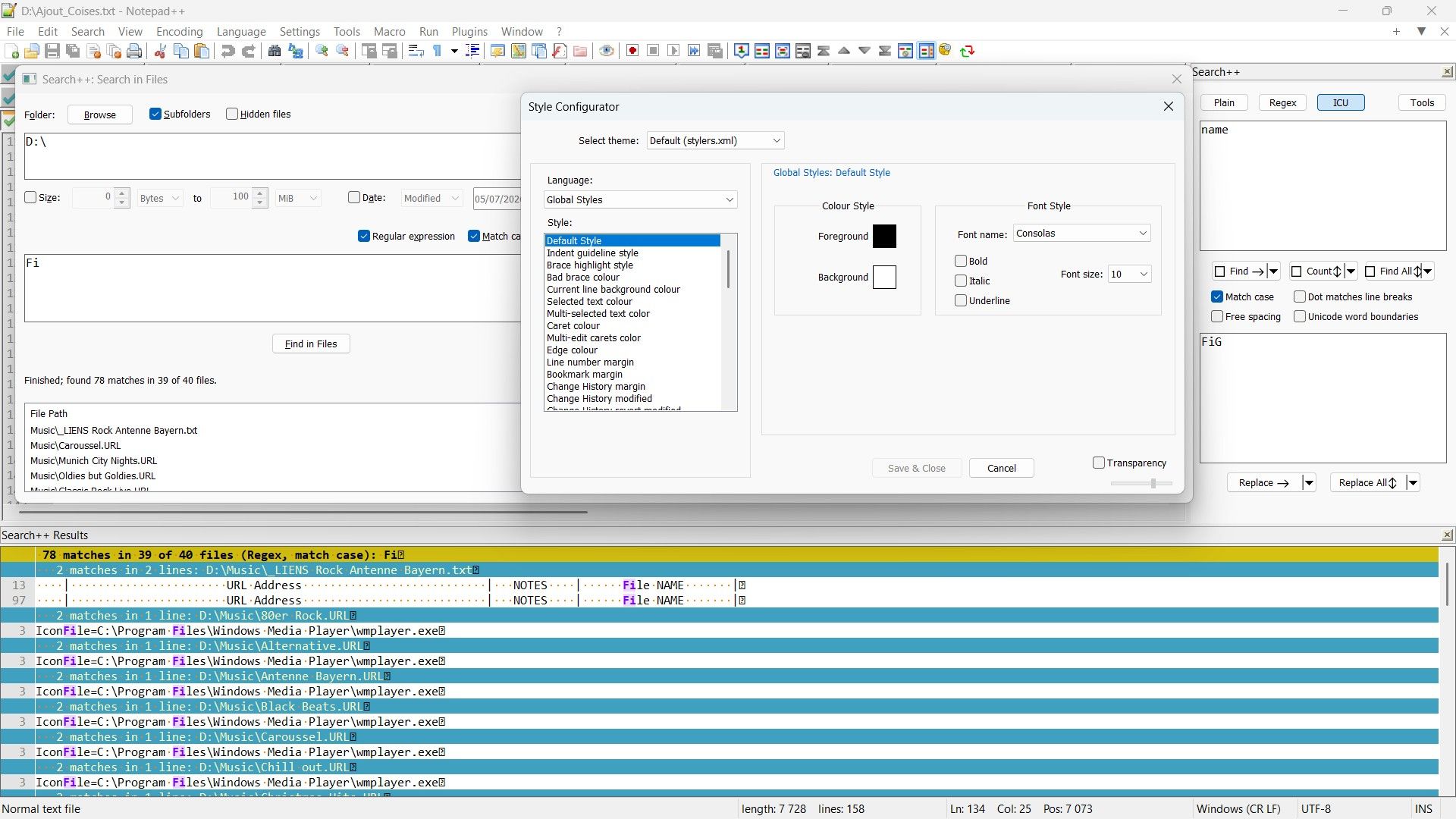
-
I did not hit the Show All characters option (
¶) -
I did a search on a specific folder (
^Music) -
Most of the time, I use the Consolas font (
Consolas / Version 7.00 / Disposition **Open Type** signé numériquement **True Type Contours)
But you found out the culprit : it’s just because the
GDI ( most compatible)option was selected !. Luckily, for any other option of the rendering mode, after closing an re-starting N++, this special character does not display, anymore !
Regarding the problem about swapping between the
Search++ Resultsand theCurrent Documentwindow, do not bother about it :-))May be, you remenber that I personally used the
Ctrl + Shift+ Nshortcut to open theSearch...option. Thus, each use of theCtrl + Shift + N, alternatively, opens or closes mySearch...docked panelSo, I was able to deduce a way ( rather long, of course ) to do that :
-
Firstly, use
Ctrl + Nshortcut to switch to theCurrent Documentwindow -
Secondly, use the
Ctrl + Shift + Nshortcut to put the focus on theSearch..panel -
Thirdly, use the
Ctrl + Hshortcut to get the focus on theSearch++ Resultspanel, again !
Even, on my French keyboard, the
Hkey is quite close to theNkey !BR
guy038
-
-
But you found out the culprit : it’s just because the GDI ( most compatible) option was selected !. Luckily, for any other option of the rendering mode, after closing an re-starting N++, this special character does not display, anymore !
Thanks for documenting that!
It should appear correctly in GDI mode too, of course. I suspect the problem will turn out to be that GDI mode doesn’t support alpha transparency, so my setting the opacity to zero is doing nothing. I’ll have to find another way.
-
Search++ version 0.6.2 is available:
- Fix a critical error that caused ICU searches to crash Notepad++.
- Fix unwanted characters appearing at the ends of lines in the Results list with Notepad++ rendering mode GDI.
- Fix regression of line ending symbols being in text color instead of white space color, and switch the CRLF symbol in GDI mode to one that hopefully renders more consistently.
Thanks to @guy038 for catching the ICU error and the unwanted characters in the results list in GDI mode.
(The ICU error appears to have been due to an uninitialized variable. The faulty code has been there from the beginning. As chance would have it, up until now it just happened to land on memory that contained an innocuous value. Hopefully I didn’t miss anything else similar…)



Hello! It looks like you're interested in this conversation, but you don't have an account yet.
Getting fed up of having to scroll through the same posts each visit? When you register for an account, you'll always come back to exactly where you were before, and choose to be notified of new replies (either via email, or push notification). You'll also be able to save bookmarks and upvote posts to show your appreciation to other community members.
With your input, this post could be even better 💗
Register Login