Search++: A work in progress
-
Now, regarding the present
Invert marks or bookmarkssub menu, below :A Invert marked text Invert marked text, excluding unmarked line endings C Invert marked text and sync bookmarks Invert marked text, excluding unmarked line endings, and sync bookmarks B Invert bookmarks D Invert bookmarks and mark only bookmarked lines Invert bookmarks and mark only bookmarked lines, excluding line endingsThis time, I would avoid any option that excludes the
EOLsand I propose this new sub-menu :A Invert only the marked text B Invert only the bookmarks D Invert bookmarks, then mark all text and EOL of the bookmarked lines C Invert marked text, then bookmark all lines containing marked textSince Notepad++ already has an Inverse Bookmarks command, what would you think of going back to a single Invert marked text command (no sub-menu) and just leaving it to users to use the Notepad++ command and/or follow up with a command from the Synchronize marks and bookmarks menu if they want one of the other results?
-
I would avoid any option that excludes the EOLs
Let me try to give an example of what I think is the problematic behavior. I agree that making users worry about whether or not to include line endings is not good.
Copy this into a new tab:
Consider this:
I see them all.
You know I see them all.
Do you understand?
Turn on display of line endings.
Make sure there are only four lines: if copying added a trailing CRLF, remove that.Now, Mark using Regex with the following find text:
I see.*$
and Dot matches line breaks not checked.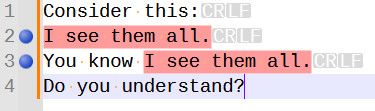
Now, observe what happens with each of these three seemingly reasonable sequences (after each, remove marks and bookmarks, and start fresh with a new Mark command):
Invert Marked Text then Invert Bookmarks:
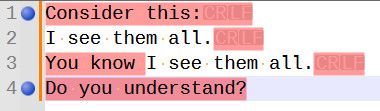
Invert marked text then Bookmark only lines with marked text:
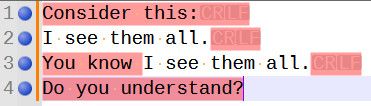
Invert bookmarks then Mark only text in bookmarked lines:
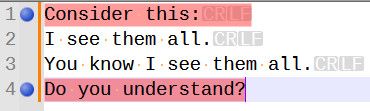
The result you probably would expect only comes from Invert marked text, excluding unmarked line endings, and sync bookmarks:
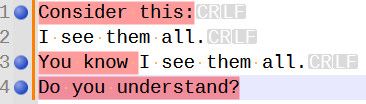
I did this with line endings displayed so you can follow what is happening. Now go back and imagine how it looks to a user with line endings not displayed.
-
Hello, @coises and All,
@coises, you said :
Since Notepad++ already has an Inverse Bookmarks command, what would you think of going back to a single Invert marked text command (no sub-menu) and just leaving it to users to use the Notepad++ command and/or follow up with a command from the Synchronize marks and bookmarks menu if they want one of the other results?
Oh, yes, of course, no need to reinvent the wheel !
In that case, you could add, in the section speaking of the
Invert marked textoption within the documentation, that theInvert bookmarked linescommand can be run directly from N++ and that, for a better readability, you may follow the N++ command by, either :-
The
Mark only text in bookmarked linesoption -
The
Mark only text in bookmarked lines, excluding line endingsoption
of the present
Synchronize marks and bookmarkssub menu !OR the options :
-
Clear all marks, then mark all text and EOLs of the bookmarked lines -
Clear all marks, then mark all text of the bookmarked lines, excluding EOLs
From my suggested
Synchronize marks and bookmarkssub-menu !Best Regards
guy038
-
-
Hi, @coies and All,
Oh, sorry, @coises. I did not notice that you had posted something in the meantime. So, give me some minutes to understand your post !
BR
guy038
-
Hello, @coises,
Personally, after an
Invert bookmarksaction, I would expect aMark only text in bookmarked linesaction OR aMark only text in bookmarked lines, excluding line endingsaction,as I explained in my last post !Best Regards
guy038
-
OR the options :
-
Clear all marks, then mark all text and EOLs of the bookmarked lines
-
Clear all marks, then mark all text of the bookmarked lines, excluding EOLs
From my suggested
Synchronize marks and bookmarkssub-menu !Previously you suggested:
So, most of the time, taking the line-breaks in account is not necessary ! However, adding the line-breaks characters is useful as it also includes the true empty lines !
Thus, this would simplify the
Synchronize marks and bookmarkssub-menu to the following one :Bookmark only lines containing marked text Clear all bookmarks, then bookmark only lines containing marked text Bookmark visible lines Mark all text and EOLs of the bookmarked lines Clear all marks, then mark all text and EOLs of the bookmarked linesBut then, just a moment ago, you wrote:
Personally, after an
Invert bookmarksaction, I would expect aMark only text in bookmarked linesaction OR aMark only text in bookmarked lines, excluding line endingsaction,as I explained in my last post !so it sounds like you have changed your mind (unless I misunderstood your first suggestion) and believe users do need the ability to control whether line endings are included.
The ideas at the front of my mind now are:
-
Make Invert marked text a single command (no Invert sub-menu) which does only and exactly that one thing: mark every unmarked character and unmark every marked character. No bookmark changes, and no special treatment for line ending characters.
-
Eliminate the “Bookmark first line of marked text” options. If you’re manipulating bookmarks based on marked text, trying to keep track of what is the “first line” is probably useless, confusing or both. (I still might remove that whole section of the Configure bookmarks dialog, too.)
-
For the Synchronize commands which Bookmark lines containing marked text, apply these rules:
- Lines containing only a line ending (empty lines) are bookmarked if the line ending is marked.
- Lines containing characters other than the line ending character(s) are bookmarked if any character other than the line ending character(s) is marked; the line ending is ignored.
That third point is clumsy to explain (and certainly won’t fit in a menu item), but I think it makes synchronizing bookmarks to marks behave sensibly without introducing variants in either Invert marked text or [Clear bookmarks and] Bookmark lines containing marked text.
I’m curious if you can think of situations where that would not behave as a user would expect.
So, back to the situation where it’s the bookmarks that are primary, and you want update marks to follow bookmarks. I gather you do think it’s important to give the user control of whether line endings are included or not.
Do you have specific cases or workflows in mind where each of these is useful? (I know, I’m the one that included the distinction in the first place, and now I’m trying to get rid of it if I can.)
And/or perhaps there should be a separate option to expand marks to full lines (that is, if there is any marked text on a line, mark the entire line), with a choice to include or exclude line endings.
There is also the possibility of turning Synchronize into a dialog instead of a sub-menu. That would allow for more options that could work separately or together without a huge menu of hard-to-read items, at the expense of slowing users’ workflow a bit more than a sub-menu.
I’m still undecided; all observations and ideas are welcome.
-
-
Hello, @coises and All,
I’m really sorry for the confusion. Actually, overall, I think of bookmarks in
Search++more or less the same way they’re used inN++. That is to say:-
Lines with bookmarks may or may not end with a line break ( cases : Mark
^.*or Mark^.*\R) -
The marked text may be present or not :
For example, within N++, with the
Bookmark lineoption checked, mark all lines with^.*\R, first, then uncheck theBookmark lineoption and finally use theClear all marksbutton => The bookmarked lines are still present and you can act on them although no marked text exists anymore !In all cases, once these bookmarked lines are copied / cutted to another location or into another file, you’ll find the exact same text !
Of course, the case
^.*\Rshould be preferred, when necessary, as it takes in account true empty lines. If the empty lines are not needed, just use the^.+\Rregex to mark the text !Thus, in my previous post, I made a mistake. I should have written :
Personally, after an
Invert bookmarksaction, you may possibly use theMark only text in bookmarked linesoption, for a better coherence and readability !
You said :
The ideas at the front of my mind now are:
Make Invert marked text a single command (no Invert sub-menu) which does only and exactly that one thing: mark every unmarked character and unmark every marked character. No bookmark changes, and no special treatment for line ending characters.
Eliminate the “Bookmark first line of marked text” options. If you’re manipulating bookmarks based on marked text, trying to keep track of what is the “first line” is probably useless, confusing or both. (I still might remove that whole section of the Configure bookmarks dialog, too.)
For the Synchronize commands which Bookmark lines containing marked text, apply these rules:
Lines containing only a line ending (empty lines) are bookmarked if the line ending is marked.
Lines containing characters other than the line ending character(s) are bookmarked if any character other than the line ending character(s) is marked; the line ending is ignored.I totally agree to these three expectations !
You said :
I’m curious if you can think of situations where that would not behave as a user would expect.
No, up to now, I cannot think about such situations, either !
You said, near the end of you post :
So, back to the situation where it’s the bookmarks that are primary, and you want update marks to follow bookmarks. I gather you do think it’s important to give the user control of whether line endings are included or not.
No, I don’t think the user control of line-endings is that important. Again, @coises, sorry for the confusion ! Actually, I think it’s better to take
EOLsin account, in all cases !So, don’t worry, anymore, about the necessity of distinguish the cases with OR without
EOLcharacters ! Anyway, once the bookmarked lines are copied / cutted, it’s not the marked text which is copied / cutted but the bookmarked lines THEMSELVES !Best Regards
guy038
-
-
Search++ version 0.7.1 is available:
-
Fix incorrect decoding of surrogate pairs in UTF-16 files when using Search in Files.
-
Fix failure to apply regex customizations (named classes ignore case insensitivity, \X follows Unicode standard) when searching UTF-16 files using Search in Files.
-
Fix Replace All doesn’t add to replace box history.
-
Improve efficiency of search in files for file encodings other than UTF-8 when the files have long lines with multiple matches per line.
-
More accurate updates to progress (percent) monitoring in Search in Files when there are long lines with multiple matches per line.
-
Make right-click equivalent to Shift+click in menus.
-
Add Configure bookmarks dialog, accessible from the Tools menu, offering options regarding bookmark handling when Bookmark lines when marking text is active.
-
Add Synchronize marks and bookmarks sub-menu on the Tools menu.
Help has been updated. See especially the Tools menu section for a full description the menu commands and the Configure bookmarks dialog options.
Comments, observations, suggestions and criticisms are most welcome!
Thanks to all who provided feedback on the enhanced bookmark handling design. It’s not “set in stone,” so please continue to tell me about anything that doesn’t seem right.
-
-
- Add Synchronize marks and bookmarks sub-menu on the Tools menu.
I see that the new Synchronize menu item
Bookmark visible lines
has changed to
Bookmark visible lines, and clear other bookmarks
In the prior version, it did not always clear other bookmarks and still does not clear them. I have been using
[Show]
followed by
Bookmark visible lines
to add bookmarks, so I like the behavior being the same as it was, but the item title doesn’t match. If it’s going to clear bookmarks, there needs to be a non-clearing item.
Bookmark lines when marking text
Add bookmarks but do not remove them.made no difference.
-
I see that the new Synchronize menu item
Bookmark visible lineshas changed to
Bookmark visible lines, and clear other bookmarksIn the prior version, it did not always clear other bookmarks and still does not clear them. I have been using
[Show]followed by
Bookmark visible linesto add bookmarks, so I like the behavior being the same as it was, but the item title doesn’t match. If it’s going to clear bookmarks, there needs to be a non-clearing item.
Thank you for catching that! You’re right: a quick check in the code shows that it does not clear preexisting bookmarks.
For symmetry with the other items, I think I’ll split it into two items, like the rest. When the next version comes out this item will clear old bookmarks, and there will be an Add bookmarks to visible lines that doesn’t clear.
-
Hi, @coises,
I’ve just tested your new
v.0.7.1release !
Let’s suppose that we marked the occurrences of the word
testin the text below, that you’ll paste in a new tab :bla blah This is the test to do bla blah test bla blahAnd that we checked the
Bookmark lines when marking text (Shift: configureoption, in theToolsmenu=> The line
4and7are bookmarked and the two occurrences of the wordtestare markedIn an old post, I said that, in order to get the complementary regex, we had to use the
^((?!test).)*$regex as below :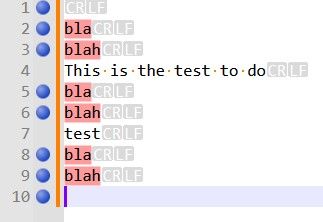
Luckily, there’s no need to find out this complementary regex, anymore :
- First, mark all the occurrences of the word
test.
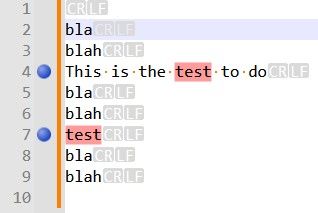
- Right-click within the bookmark margin of N++ and choose the
Inverse bookmarksoption.
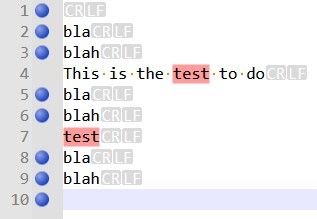
- Then, go to the
Synchronize marks and bookmarksoption of theToolsmenu and choose theMark all text in bookmarked lines and clear other marksoption
=> You should get this snapshot :
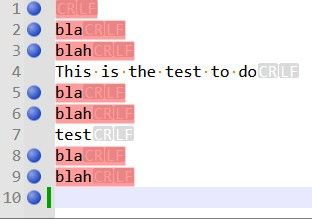
Which correctly bookmarked all the lines not containing the word
testand then marked all contents of the bookmarked lines, including theEOLs, as well !
I tested, both :
-
The
Bookmark lines with marked text, and clear other bookmarksoption VS theAdd bookmarks to lines with marked textoption -
The
Mark all text in bookmarked lines, and clear other marksoption VS theAdd marks to all text in bookmarked linesoption
And, if I understand you correctly, you mean that the
Synchronize marks and bookmarkssub-menu, in your future release, will look as below :Bookmark lines with marked text, and clear other bookmarks Bookmark visible lines, and clear other bookmarks Mark all text in bookmarked lines, and clear other marks Add bookmarks to lines with marked text Add bookmarks to visible lines Add marks to all text in bookmarked linesYes, that’s totally coherent : The first three items do a
clearoperation whereas the last three items simply add bookmarks / marks to the existing layout !Best Regards
guy038
P.S. :
Just a random question about regex. In the sample of text above :
-
If I try to mark the
\zregex with your plugin, I do get the bookmarkred line10, which is the final empty line of the text -
If I mark all the occurrences of the
(?-s)^((?!test).)*\Rregex => All lines, but lines4, 7, 10, are bookmarked and text withEOLs, in lines1, 2, 3, 5, 6, 8, 9is marked
However, marking all occurrences of the
^(?-s)((?!test).)*\R|\zregex do not bookmark the final line10, nor the(?-s)^((?!test).)*$\R?regex and nor the(?-s)^((?!test).)*(\R|\z)regex !Not important, though. Do you have an explanation ?
- First, mark all the occurrences of the word
-
Do you have an explanation ?
This is exceedingly odd. Thank you for identifying and describing it clearly. I do not have an explanation, but I think it has to be a bug (and not just a quirk of regex). Here’s why.
We can’t compare the same test in native Notepad++ search, because Mark doesn’t count or bookmark null matches. (The same with Count and Find All: in Notepad++ native search, they ignore null matches.)
However, single-step Find does identify null matches in both engines. In Notepad++ native search using Find Next, your expression
(?-s)^((?!test).)*\R|\zidentifies eight matches. The last is at the end of the file and shows the^ zero length matchmessage.In Search++ Regex with Find, it only finds seven.
What is even more peculiar is if you switch to the ICU engine and Mark the same expressions. In ICU as in Regex,
\zalone does as you would expect, bookmarking the last line and showing the message “Found 1 match (0 marked, 1 null).” ICU also does the same as Regex with(?-s)^((?!test).)*\R, marking and bookmarking seven lines, exactly as you would expect.Adding the
|\zto the end changes nothing in Regex, though you would expect to see “Found 8 matches (7 marked, 1 null)” and a bookmark on the last line. In ICU it not only doesn’t bookmark the last line, it finds and bookmarks nine matches, marking the LF, but not the CR or the rest of the line, on the lines containingtest!As far as I can tell (I might not have tested every possible combination yet), both Regex and ICU are self-consistent in that they Find and Count and Find All the same things they mark/bookmark.
Why adding
|\zcauses such strange behavior — in ICU even leading to new matches in the middle of the file — as yet I have no clue. -
Do you have an explanation ?
and I wrote:
I think it has to be a bug
It is, and it’s a fairly simple error in my logic. If a match ends at the end of the file (or the end of a selection or a span of marked text, if you’re searching within one of those), the search ends (or moves on to the next selection or span of marked text) without checking whether the expression can match null there. It will be fixed in the next release.
Why adding
|\zcauses such strange behavior — in ICU even leading to new matches in the middle of the file — as yet I have no clue.The code supporting ICU search has the same logic error as the Regex search does, but there’s an additional oddity which seems to be built into ICU’s regular expression search. As best I can tell, it treats the circumflex (
^) differently when it is the first element of the only alternative and in all other contexts. As an example, see the difference between marking^\n(which matches nothing in Guy’s test text) and^\n|Q(which matches the line feed at the end of each of the first nine lines).Note: I suggested using Mark to show this because Scintilla will not allow a selection to encompass only part of a line ending, so it’s less clear what is happening with Select or stepwise Find commands. The Search++ results list doesn’t have the option to show line endings — perhaps it should! — so Find All is also unclear.
I’m not sure if this is expected behavior. ICU describes the circumflex as “Match at the beginning of a line” but, as far as I can find, says nothing about it behaving differently in different positions or expressions.
-
Hi, @coises, @thomas-knoefel and All,
FIRST test :
The only way to bookmark the last empty line
10, that I found, is to use the regex^((?!test).)*$again my example text, below :bla blah This is the test to do bla blah test bla blahSome observations :
-
Using Search++, in mode Regex, this regex counts
8matches, whose line1with ONLY a small blue triangle at bottom of line1and the last empty line10with the calltip^ zero length match -
Using Columns++, this regex counts also
8matches, but, this time, the first line returns, instead, the calltip^ zero length match -
Using Search++, in mode ICU this regex counts
7matches, whose line1with ONLY a small blue triangle at bottom of line1. So the line10is not a match
SECOND test :
Paste the text below in a new tab and search, in regex mode, for the regex
^abcabc abc abc 0011 abc 0012 abc abc 0085 abc 2028 abc 2029 abc After the above \r\n ==================================== abc 0009 abc 0020 abc 00A0 abc 00AD abc 2000 abc 200A abc 202F abc 205F abc 3000 abc 200B abc 200C abc 200D abc 2060 abc FEFF abc FFFA abc FFFB abc FFFCMay be, after pasting, you’ll have to change the line
2which needs to be anLFchar ONLY and line5which needs to be anCRchar ONLY !-
With N++ and MultiReplace the
^abcregex counts8matches. So a beginning of line is seen :-
At the very beginning of the file
-
After a
LFcharacter -
After a
FFcharacter -
After a
CRcharacter -
After a
NELcharacter -
After a
LScharacter -
After a
PScharacter -
After a
\r\nstring, in line9
-
-
With the Columns++ and Search++ Regex the
^abcregex counts4matches. So a beginning of line is seen :-
At the very beginning of the file
-
After a
LFcharacter -
After a
CRcharacter -
After a
\r\nstring, in line9
-
-
With Search++ ICU, the
^abccounts9matches. So a beginning of line is seen, like with N++ and MultiReplace and, also, after aVTcharacter.
Seemingly, in
ICUmode, the\r\ncouple is not considered as one char. Thus, the regex^\n|Qdo see theCRcharacter as a beginning of line (^). However, in this case, I do not understand why the^\nregex finds nothing at all !
THIRD test
-
Note that in Search++ Settings, I checked the
Always unmark all text before Mark command. (Otherwise add to existing marked text.)option. -
In addition, I chose the
Bookmark lines when marking textoption, in theToolsmenu
Thus, in all cases, all the marked text and all the bookmarked lines should be wiped out before a new
Markcommand.Using my example text, described above, I marked, in
ICUmode, all the lines which match the regex^\n|Q, as shown in the snapshot below :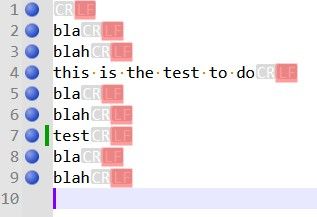
Then, I simply searched for the
^\nregex. As noticed above, this regex finds nothing. However, after clicking on theMark in Whole documentoption, the previous marks and bookmarks remain unchanged ?I expected no marked text and no bookmrked line ! I suppose it’s a bug.
Best Regards
guy038
-
-
Hello, @coises,
I said, at the end of the second test section :
Thus, the regex
^\n|Qdo see theCRcharacter as a beginning of line (^)I didn’t express myself clearly. I should have written :
Thus, the regex
^\n|Qdo see the transition between eachCRcharacter to its nextLFcharacter as a beginning of line (^)BR
guy038
-
The only way to bookmark the last empty line
10, that I found, is to use the regex^((?!test).)*$Yes, that’s the bug you found. The precise conditions are that if a match includes the last character in the file, Search++ fails to check for the possibility of a null match at the end of the file. That will be fixed in the next release.
- Using Search++, in mode Regex, this regex counts
8matches, whose line1with ONLY a small blue triangle at bottom of line1and the last empty line10with the calltip^ zero length match
Yes. Where possible I use the small triangle to mark a zero-length match. There are two situations where that isn’t possible, due to Scintilla limitations: when the match is at the end of a line, before the line ending characters, and line ending characters are not shown; and when the match is at the very end of the file. In those cases, I use the
^ zero length matchbanner instead.I use triangles for zero length matches in the Search++ results list and with the Show command, too. The same limitations apply with Show, but because call tips disappear when you interact with the text, I can’t really do anything about the indicators you can’t see. In the results list you can always see them because I can safely change some settings so that I can use line ending characters that Scintilla considers displayed, but that don’t actually show anything you can see.
- Using Columns++, this regex counts also
8matches, but, this time, the first line returns, instead, the calltip^ zero length match
Yes, I hadn’t thought of the triangle method yet when I wrote Columns++.
- Using Search++, in mode ICU this regex counts
7matches, whose line1with ONLY a small blue triangle at bottom of line1. So the line10is not a match
As best I can tell, ICU’s regex engine does not consider the position following the last character in the document to be the beginning of line, regardless of whether the last character is a line ending character. That makes sense, really, but it doesn’t conform to the way Scintilla lays out lines. So your expression doesn’t match because the circumflex doesn’t match.
-
With N++ and MultiReplace the
^abcregex counts8matches. So a beginning of line is seen :-
At the very beginning of the file
-
After a
LFcharacter -
After a
FFcharacter -
After a
CRcharacter -
After a
NELcharacter -
After a
LScharacter -
After a
PScharacter -
After a
\r\nstring, in line9
-
-
With the Columns++ and Search++ Regex the
^abcregex counts4matches. So a beginning of line is seen :-
At the very beginning of the file
-
After a
LFcharacter -
After a
CRcharacter -
After a
\r\nstring, in line9
-
-
With Search++ ICU, the
^abccounts9matches. So a beginning of line is seen, like with N++ and MultiReplace and, also, after aVTcharacter.
Yes, Columns++ and Search++ Regex do their best (I think they succeed) to treat the same things as line endings that are visible as line endings in Notepad++. So, for example, in your Total_Chars.txt,
^matches 3 times in Columns++ and in Search++ Regex; it matches 13 times in Search++ ICU; and in Notepad++ native search, if you use Find Next (since Count ignores null matches) and count manually (making sure not to miss the match at the very beginning of the file) there are 7 matches.Likewise,
(?-s:(?!.))(?s:.)produces 6 matches in Notepad++ (you can use Count for this one), 2 matches in Columns++ and Search++ Regex, and 7 matches in Search++ ICU.I’m not sure yet what causes the extra matches for
^in ICU; it could be something I’ve done wrong in preparing the string, it could be a bug in ICU4C, or could just be something I don’t understand.Seemingly, in
ICUmode, the\r\ncouple is not considered as one char. Thus, the regex^\n|Qdo see theCRcharacter as a beginning of line (^). However, in this case, I do not understand why the^\nregex finds nothing at all !ICU appears to treat
^differently in different expressions. So far, it looks to me as if, when it is the first thing to match in the only alternative, it treats CRLF as one, but when it’s anywhere else, it treats CR and LF each as line ending characters even when they are together in that order. That’s just from trying to infer a pattern behind what I’ve observed; I can’t find any documentation of such a thing. It could be a bug, or just something I don’t know.Then, I simply searched for the
^\nregex. As noticed above, this regex finds nothing. However, after clicking on theMark in Whole documentoption, the previous marks and bookmarks remain unchanged ?I expected no marked text and no bookmrked line ! I suppose it’s a bug.
It is working as intended, but perhaps the design is confusing. I had to keep the text in the Settings dialog reasonably brief, but I see I didn’t describe the details correctly in the help.
Existing marks (and bookmarks, if applicable) are cleared if the command is successful, meaning it finds at least one match. (Internally, it waits until it finds the first match and only clears the existing marks after it has found the first match, but before it marks it.) If there is an error, or if no match is found, nothing is cleared.
Since you can’t “undo” changes in marks and bookmarks, I thought that at least in the case where someone mistypes a search string resulting in no matches, it would be better not to lose the marks (or selections, or shown text and lines, as the case might be), so one could easily try again.
- Using Search++, in mode Regex, this regex counts
-
Hello, @coises,
You said, at the end of my last post :
Existing marks (and bookmarks, if applicable) are cleared if the command is successful, meaning it finds at least one match. (Internally, it waits until it finds the first match and only clears the existing marks after it has found the first match, but before it marks it.) If there is an error, or if no match is found, nothing is cleared.
I verified that if I, simultaneously, check the third options :
-
☑
Always clear selections before Select command. (Otherwise add to existing selections.) -
☑
Always unmark all text before Mark command. (Otherwise add to existing marked text.) -
☑
Always hide all lines and remove Show style from text before Show command
Nothing is cleared if current search does not find any match or finds an error, regarding selections, marks, and shown text
Therefore, I think it would be a good idea to mention this fact in the Search++ documentation, within the cleaning section of Search++ settings !
Best Regards
guy038
-
-
Hi @guy038,
MultiReplace doesn’t use a regex engine of its own: its searches run through Notepad++'s Scintilla, i.e. through Notepad++'s Boost regex engine. So
^and$see the same line breaks as the native Find dialog, which with Boost also includes FF, NEL, LS and PS. That is intended: MultiReplace should always find the same matches as Notepad++ itself. -
@astewart77, @guy038 and anyone else who cares to comment:
As noted, I still didn’t get the Synchronize marks and bookmarks sub-menu right in version 0.7.1. I am interested if you have any preference among these three possibilities:
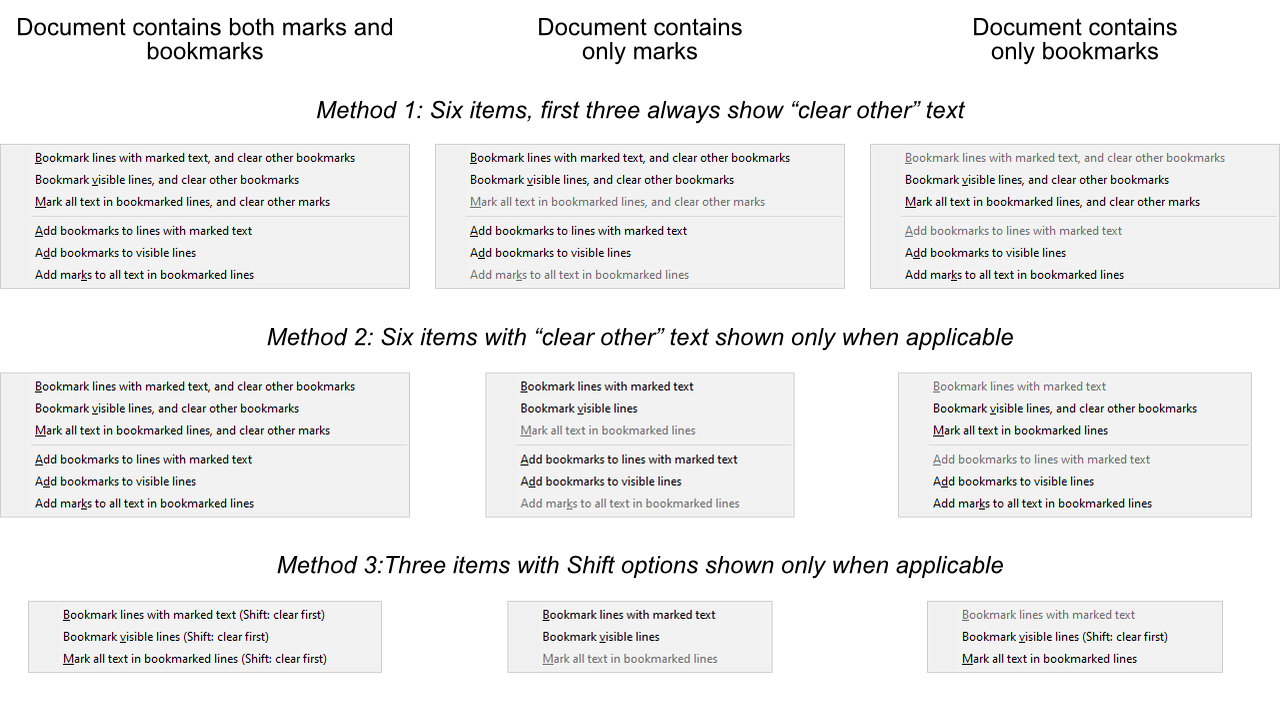
or if you would suggest anything else?
As elsewhere, right-click would be equivalent to Shift+click.
-
Hi, @coises, @astewart77 and All,
Ah,…, personally, I’m voting for the Methiod 3 as we are already used to the
Shiftbehaviour. In addition, it remains only three items in the menu which appears more clear !This is coherent with the
Mark selected text (Shift: clear first)andMark shown text (Shift: clear first)options, in theToolsmenu !Best Regards,
guy038




Hello! It looks like you're interested in this conversation, but you don't have an account yet.
Getting fed up of having to scroll through the same posts each visit? When you register for an account, you'll always come back to exactly where you were before, and choose to be notified of new replies (either via email, or push notification). You'll also be able to save bookmarks and upvote posts to show your appreciation to other community members.
With your input, this post could be even better 💗
Register Login