Community
    • Login

    paragraph line break

    Scheduled Pinned Locked Moved Help wanted · · · – – – · · ·
    33 Posts 5 Posters 10.0k Views 2 Watching
    Loading More Posts
    • Oldest to Newest
    • Newest to Oldest
    • Most Votes
    Reply
    • Reply as topic
    Log in to reply
    This topic has been deleted. Only users with topic management privileges can see it.
    • kracovwolfK Offline
      kracovwolf
      last edited by

      thanks that works!
      Np is a great program. Is there a plugin that can run multiple macros at once?

      EkopalypseE 1 Reply Last reply Reply Quote 0
      • EkopalypseE Offline
        Ekopalypse @kracovwolf
        last edited by

        @kracovwolf

        Never tested, but I assume one way would be to edit shortcuts.xml and merge multiple macros into one.

        Another attempt would be to use PythonScript plugin and
        write a script with multiple runMenuCommands like this one
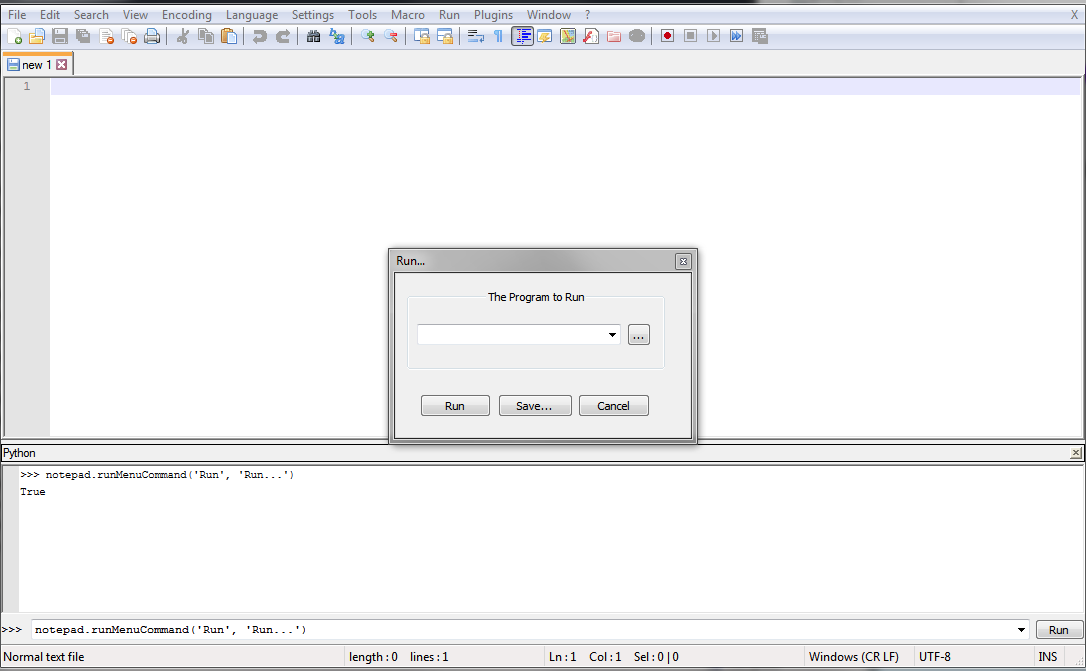
        62fc0036-2ec4-4a0b-8750-91af7b52d208-image.png

        1 Reply Last reply Reply Quote 2
        • kracovwolfK Offline
          kracovwolf
          last edited by

          Hmm I don’t know a lot about code but I have edited firefox scripts before.

          EkopalypseE 1 Reply Last reply Reply Quote 0
          • EkopalypseE Offline
            Ekopalypse @kracovwolf
            last edited by Ekopalypse

            @kracovwolf

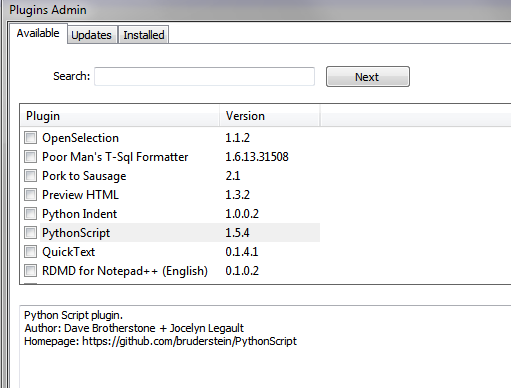
            It’s easy. Install the plugin via Plugin Manager,
            then create a new script via Plugins-PythonScript->New script.
            Give it a meaningful name and save.
            Add mulitple lines

            notepad.runMenuCommand('Run', 'NAME OF THE MACROS AS SHOWN IN RUn MENU')
            

            done, well - save it and run it via Plugins->PythonScript->scripts…

            1 Reply Last reply Reply Quote 1
            • kracovwolfK Offline
              kracovwolf
              last edited by

              PyNPP? I installed it but no option to create a script?

              EkopalypseE 1 Reply Last reply Reply Quote 1
              • EkopalypseE Offline
                Ekopalypse @kracovwolf
                last edited by

                @kracovwolf - no, PythonScript plugin - it is called PythonScript. :-)

                1 Reply Last reply Reply Quote 0
                • kracovwolfK Offline
                  kracovwolf
                  last edited by kracovwolf

                  I realized i didn’t have plugin manager. i was using plugin admin. but the plugin manager doesnt have a list. tried ticking untested plugins, there was an error

                  EkopalypseE 1 Reply Last reply Reply Quote 1
                  • EkopalypseE Offline
                    Ekopalypse @kracovwolf
                    last edited by

                    @kracovwolf - sorry for confusion. I don’t know why I still use the term Plugin Manager when it should be Plugin Admin

                    1 Reply Last reply Reply Quote 0
                    • EkopalypseE Offline
                      Ekopalypse
                      last edited by

                      441bc588-5994-4b7a-b07d-541ebeca13d9-image.png

                      1 Reply Last reply Reply Quote 1
                      • kracovwolfK Offline
                        kracovwolf
                        last edited by

                        turns out i had to update npp to see the plugin. but when creating a new script its asking me for a .py file. i assume this is where i create a txt file and rename the extension?

                        EkopalypseE 1 Reply Last reply Reply Quote 0
                        • EkopalypseE Offline
                          Ekopalypse @kracovwolf
                          last edited by

                          @kracovwolf - just provide a name and keep the py extension

                          1 Reply Last reply Reply Quote 0
                          • EkopalypseE Offline
                            Ekopalypse
                            last edited by

                            then a new document opens and there you put your runMenuCommands in

                            1 Reply Last reply Reply Quote 0
                            • kracovwolfK Offline
                              kracovwolf
                              last edited by

                              im sorry… trying hard to follow your directions but i’m lost. when you say multiple lines, do you mean empty lines to add to the new document, or copies of the code you provided? i’m also confused about “run menu” Again i apologize

                              EkopalypseE 1 Reply Last reply Reply Quote 0
                              • EkopalypseE Offline
                                Ekopalypse @kracovwolf
                                last edited by

                                @kracovwolf - pythonscript plugin is installed ,correct?

                                1 Reply Last reply Reply Quote 0
                                • kracovwolfK Offline
                                  kracovwolf
                                  last edited by

                                  yes i created the script too

                                  EkopalypseE 1 Reply Last reply Reply Quote 0
                                  • EkopalypseE Offline
                                    Ekopalypse @kracovwolf
                                    last edited by Ekopalypse

                                    @kracovwolf
                                    ok, then you need multiple lines of

                                    notepad.runMenuCommand('Macro', 'NAME OF THE MACROS AS SHOWN IN Macro MENU')
                                    
                                    1 Reply Last reply Reply Quote 0
                                    • EkopalypseE Offline
                                      Ekopalypse
                                      last edited by

                                      You can test if the command has been successfully sent if you
                                      execute it via the console like I did in the first screenshot.
                                      It has to return true. If false appears then something is wrong with your command.

                                      1 Reply Last reply Reply Quote 0
                                      • kracovwolfK Offline
                                        kracovwolf
                                        last edited by

                                        i created the macro codes now what? use the run command but what program?

                                        1 Reply Last reply Reply Quote 0
                                        • EkopalypseE Offline
                                          Ekopalypse
                                          last edited by Ekopalypse

                                          @kracovwolf
                                          You use notepad++. Goto Plugins->PythonScript->Scripts
                                          and click your python script.

                                          1 Reply Last reply Reply Quote 0
                                          • kracovwolfK Offline
                                            kracovwolf
                                            last edited by

                                            nothing happened, nothing in console except the Ready message

                                            EkopalypseE 1 Reply Last reply Reply Quote 0

                                            Hello! It looks like you're interested in this conversation, but you don't have an account yet.

                                            Getting fed up of having to scroll through the same posts each visit? When you register for an account, you'll always come back to exactly where you were before, and choose to be notified of new replies (either via email, or push notification). You'll also be able to save bookmarks and upvote posts to show your appreciation to other community members.

                                            With your input, this post could be even better 💗

                                            Register Login
                                            • First post
                                              Last post
                                            The Community of users of the Notepad++ text editor.
                                            Powered by NodeBB | Contributors