Community
    • Login

    Issue with Polish letters

    Scheduled Pinned Locked Moved Help wanted · · · – – – · · ·
    27 Posts 5 Posters 10.2k Views 1 Watching
    Loading More Posts
    • Oldest to Newest
    • Newest to Oldest
    • Most Votes
    Reply
    • Reply as topic
    Log in to reply
    This topic has been deleted. Only users with topic management privileges can see it.
    • EkopalypseE Offline
      Ekopalypse @nightznero
      last edited by

      @nightznero

      Are you saying that you can’t type Polish letters or that they are
      are not rendering correctly when you open a file, or both?

      Can you post your debug information as well as add a screenshot showing the problem?

      nightzneroN 1 Reply Last reply Reply Quote 0
      • nightzneroN Offline
        nightznero
        last edited by

        This post is deleted!
        1 Reply Last reply Reply Quote 0
        • nightzneroN Offline
          nightznero @Ekopalypse
          last edited by

          @Ekopalypse
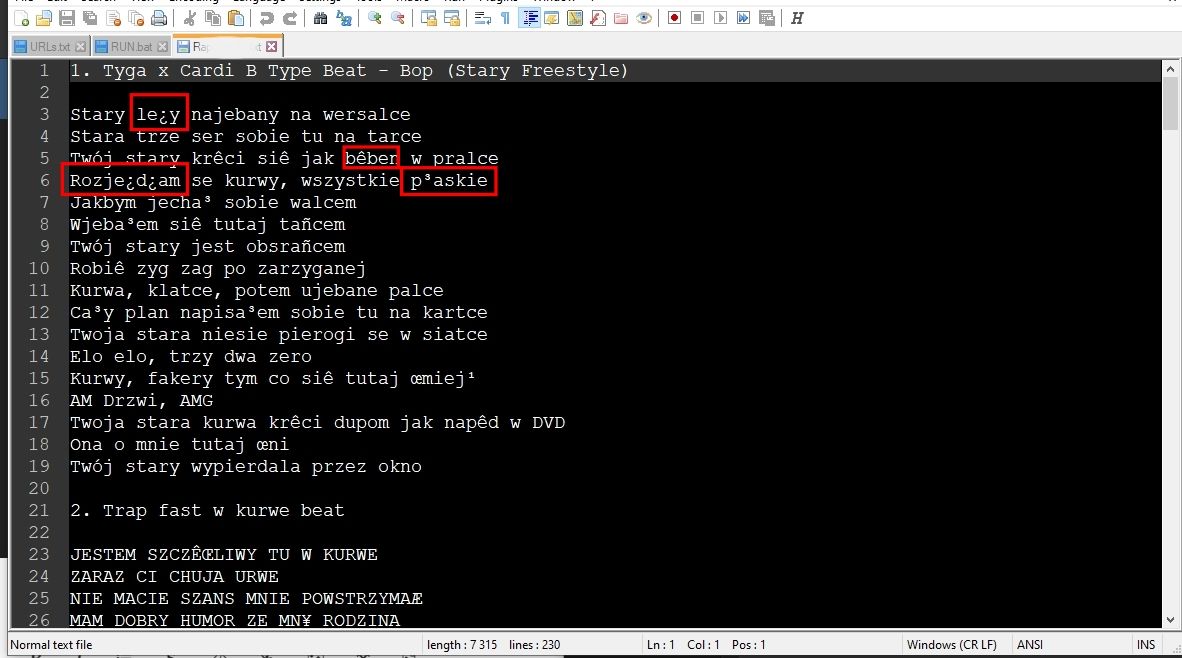
          I mean, i can write only normal letters. So ye both, i cant see them in prev files and on new i cant write them. When i try to write like ‘ą ż ź’ i see only ‘a z z’
          Debug:
          Notepad++ v7.9.5 (64-bit)
          Build time : Mar 21 2021 - 02:13:17
          Path : D:\Notepad++\notepad++.exe
          Admin mode : OFF
          Local Conf mode : ON
          OS Name : Windows 10 Pro (64-bit)
          OS Version : 2009
          OS Build : 21359.1
          Current ANSI codepage : 1252
          Plugins : HexEditor.dll mimeTools.dll NppConverter.dll NppExport.dll

          EkopalypseE 1 Reply Last reply Reply Quote 0
          • EkopalypseE Offline
            Ekopalypse
            last edited by

            Which font do you use?
            And how are you typing the letters?
            A screenshot can be added simply by copy and paste into a post.

            nightzneroN 1 Reply Last reply Reply Quote 0
            • EkopalypseE Offline
              Ekopalypse @nightznero
              last edited by

              @nightznero

              afc66d5e-2822-47c5-a21e-4180f567a82f-image.png

              1 Reply Last reply Reply Quote 0
              • nightzneroN Offline
                nightznero @Ekopalypse
                last edited by

                @Ekopalypse i was using few fonts like Arial Calibri but on all that i was using the issue is happens.Screenshot_1.jpg

                1 Reply Last reply Reply Quote 0
                • nightzneroN Offline
                  nightznero
                  last edited by

                  well i typing normally by keyboard. Not on-screen keyboard,just my main

                  EkopalypseE 1 Reply Last reply Reply Quote 0
                  • EkopalypseE Offline
                    Ekopalypse
                    last edited by Ekopalypse

                    @nightznero

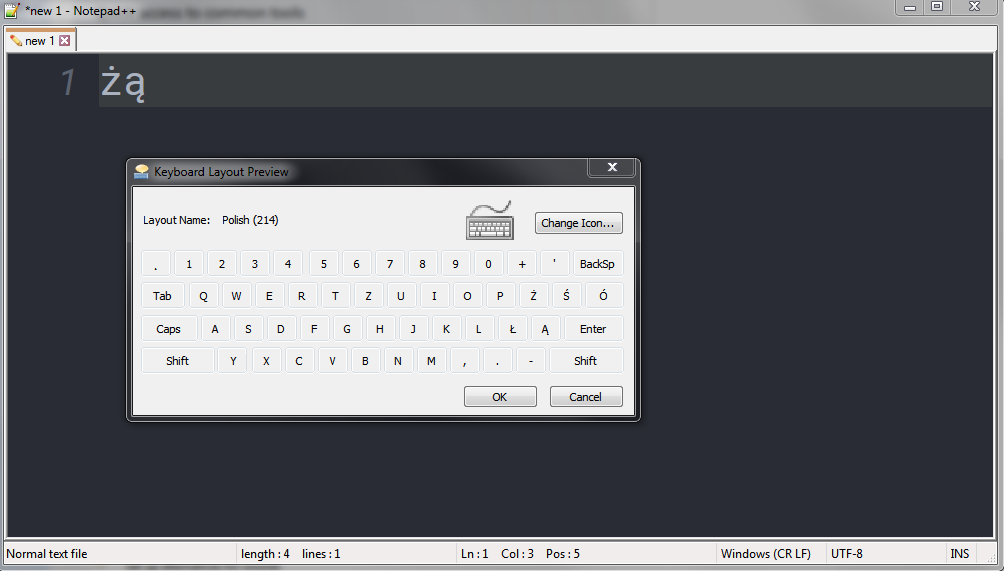
                    I just added a Polish keyboard layout and also used my keyboard.
                    By pressing “ä” and “z” (German keyboard) I got the posted result.
                    I could not figure out how to get the second z symbol.

                    When typing the letters, does it look like the screenshot you provided?

                    nightzneroN 1 Reply Last reply Reply Quote 0
                    • EkopalypseE Offline
                      Ekopalypse @nightznero
                      last edited by Ekopalypse

                      @nightznero

                      I see, when using Polish keyboard layout and ANSI encoding like you did, I see a and z only as well. But when using utf8 encoding I see the letters as posted. So maybe convert your files to utf8?

                      Btw. I pressed “ü” not “z” to get the ż

                      1 Reply Last reply Reply Quote 0
                      • nightzneroN Offline
                        nightznero @Ekopalypse
                        last edited by nightznero

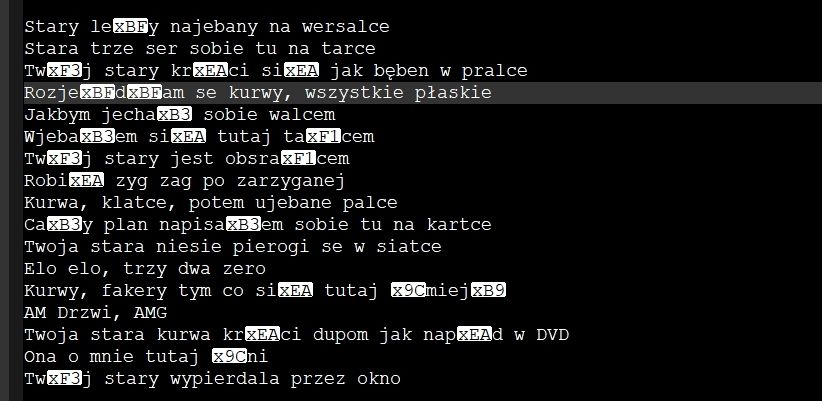
                        @Ekopalypse Ye when i try to polish letters i gotta normal without polish symbols. The utf8 fixed issue Thx but for now,when i type its fine but is there any way to fix previous files that could look normal as now?Screenshot_2.jpg
                        bcs as u can see now the polish letters are white glowed

                        EkopalypseE 1 Reply Last reply Reply Quote 0
                        • EkopalypseE Offline
                          Ekopalypse @nightznero
                          last edited by

                          @nightznero

                          I guess that will be solved by using “convert to utf8” from encoding menu, doesn’t it?

                          nightzneroN 1 Reply Last reply Reply Quote 0
                          • nightzneroN Offline
                            nightznero @Ekopalypse
                            last edited by

                            @Ekopalypse any of ‘‘convert’’ doesnt work

                            EkopalypseE 1 Reply Last reply Reply Quote 0
                            • EkopalypseE Offline
                              Ekopalypse @nightznero
                              last edited by

                              @nightznero

                              Do you have a file which you can share?

                              nightzneroN 1 Reply Last reply Reply Quote 0
                              • nightzneroN Offline
                                nightznero @Ekopalypse
                                last edited by

                                @Ekopalypse ye that from screen i can share its jsut a text. Here is a link: https://www.mediafire.com/file/2u26drmdltsrnsg/Rap_Teksty.txt/file

                                EkopalypseE 1 Reply Last reply Reply Quote 1
                                • EkopalypseE Offline
                                  Ekopalypse @nightznero
                                  last edited by Ekopalypse

                                  @nightznero

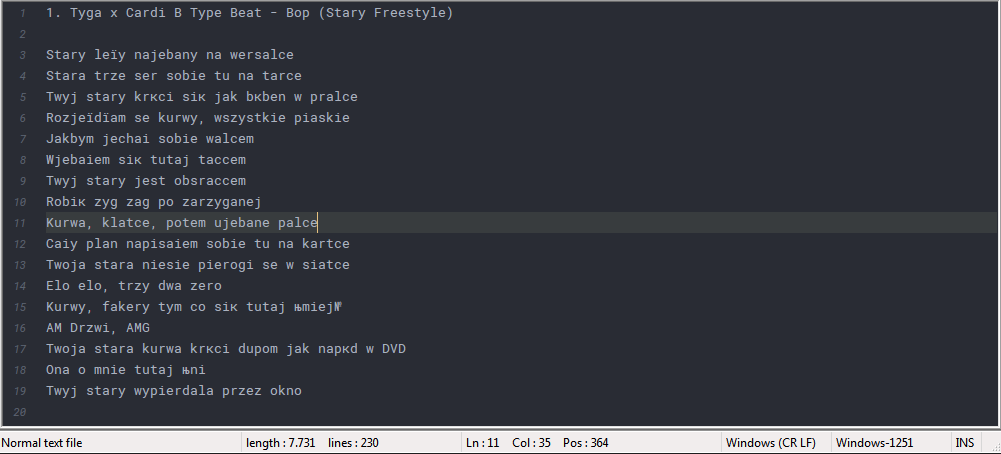
                                  that file seems to be Cyrillic (Windows-1251) encoded.

                                  31b79cfe-a81d-4226-8588-c58fe167a2d9-image.png

                                  nightzneroN 1 Reply Last reply Reply Quote 0
                                  • EkopalypseE Offline
                                    Ekopalypse
                                    last edited by

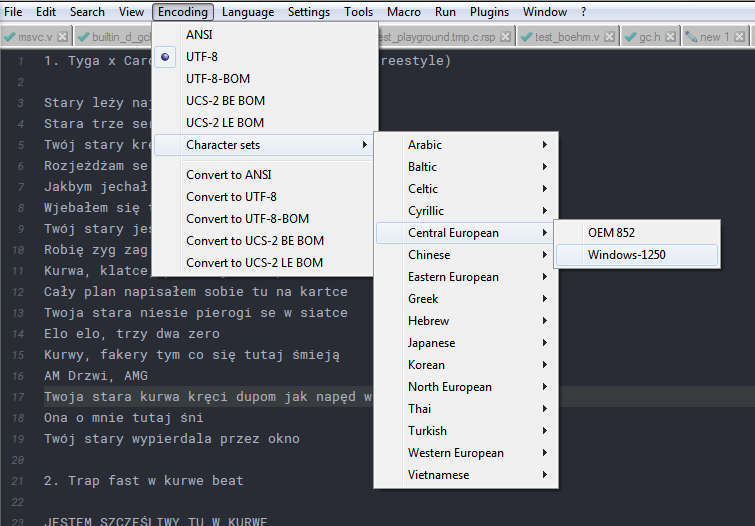
                                    NO windows1250 does make more sense, I guess.
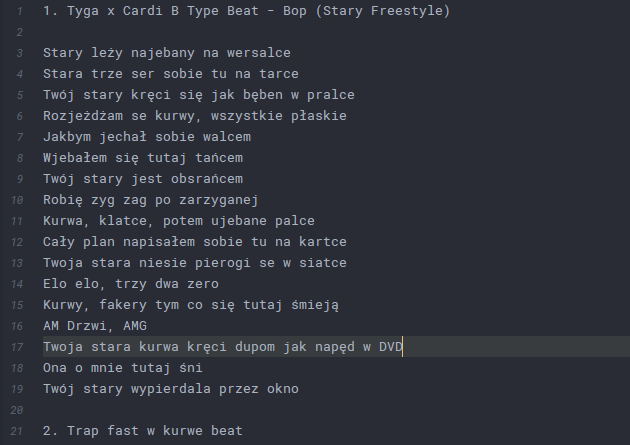
                                    5ac82498-75ff-4a9e-bdda-98bfcdf7bf36-image.png

                                    1 Reply Last reply Reply Quote 0
                                    • nightzneroN Offline
                                      nightznero @Ekopalypse
                                      last edited by

                                      @Ekopalypse when i try to encode to that u mentioned the letter ‘k’ is changed to ‘к’ so its cant be cyrlic encrypted before

                                      1 Reply Last reply Reply Quote 0
                                      • EkopalypseE Offline
                                        Ekopalypse
                                        last edited by

                                        Does my last post look ok?

                                        nightzneroN 1 Reply Last reply Reply Quote 0
                                        • nightzneroN Offline
                                          nightznero @Ekopalypse
                                          last edited by

                                          @Ekopalypse ye, its looks now fine

                                          1 Reply Last reply Reply Quote 1
                                          • EkopalypseE Offline
                                            Ekopalypse
                                            last edited by Ekopalypse

                                            That means, select Windows-1250

                                            6198d9f7-4571-46a5-b37a-71b584c9b1b0-image.png

                                            and if it looks ok - convert to utf8 - save it - done.

                                            nightzneroN 1 Reply Last reply Reply Quote 2

                                            Hello! It looks like you're interested in this conversation, but you don't have an account yet.

                                            Getting fed up of having to scroll through the same posts each visit? When you register for an account, you'll always come back to exactly where you were before, and choose to be notified of new replies (either via email, or push notification). You'll also be able to save bookmarks and upvote posts to show your appreciation to other community members.

                                            With your input, this post could be even better 💗

                                            Register Login
                                            • First post
                                              Last post
                                            The Community of users of the Notepad++ text editor.
                                            Powered by NodeBB | Contributors