Community
    • Login

    Multi selection and multi edit

    Scheduled Pinned Locked Moved Help wanted · · · – – – · · ·
    multiline
    64 Posts 18 Posters 256.1k Views 8 Watching
    Loading More Posts
    • Oldest to Newest
    • Newest to Oldest
    • Most Votes
    Reply
    • Reply as topic
    Log in to reply
    This topic has been deleted. Only users with topic management privileges can see it.
    • Scott SumnerS Offline
      Scott Sumner @bitagoras
      last edited by

      @bitagoras

      This kind of functionality really has nothing to do with Notepad++ itself, but rather is Scintilla-related. Scintilla in Notepad++ is known to be very outdated. Would upgrading Scintilla to the latest version provide such functionality? I don’t know, but since remaining current with Scintilla doesn’t seem to be a priority of Notepad++ developers, it probably isn’t worth much discussion here. :-(

      1 Reply Last reply Reply Quote 1
      • bitagorasB Offline
        bitagoras
        last edited by

        I think with a little bit of programming it could be possible with scintilla but it is not a standard feature that can just be activated.

        But you say the Notepad++ developers plan to replace Scintilla? Do you know any details? I haven’t seen any discussion here on this. I wonder, if this wouldn’t be just another new editor but not Notepad++ any more.

        Scott SumnerS 1 Reply Last reply Reply Quote 0
        • Scott SumnerS Offline
          Scott Sumner @bitagoras
          last edited by

          @bitagoras said:

          but it is not a standard feature that can just be activated

          Maybe not, I didn’t investigate–but I seem to recall that some of the “fancier” multi-selection stuff is available in newer Scintilla versions…but I don’t know if it takes it to the level of your examples. I really don’t care…until Notepad++ updates to something newer, and THEN I’ll take the time to explore what new features it provides.

          you say the Notepad++ developers plan to replace Scintilla?

          I most certainly did NOT say that! :-)

          1 Reply Last reply Reply Quote 0
          • guy038G Offline
            guy038
            last edited by

            Hello, @bitagoras, @scott-sumner and All,

            @bitagoras, why don’t you use the excellent @Dail plugin BetterMultiselection version v1.3 ? See, below :

            https://github.com/dail8859/BetterMultiSelection/

            https://github.com/dail8859/BetterMultiSelection/releases

            https://notepad-plus-plus.org/community/topic/13653/new-plugin-bettermultiselection

            Note that, if you have the last v7.6 version of N++, you’ll have to :

            • Create the new directory BetterMultiSelection, under your active plugins folder

            • Place the BetterMultiSelection.dll inside the BetterMultiSelection folder

            Now, assuming the test test, below :

            abcde fghijk lmno pqr..stuv wxyz 012345789
            abcde fghijk lmno pqr..stuv wxyz 012345789
            abcde fghijk lmno pqr..stuv wxyz 012345789
            abcde fghijk lmno pqr><stuv wxyz 012345789
            abcde fghijk lmno pqr><stuv wxyz 012345789
            abcde fghijk lmno pqr><stuv wxyz 012345789
            abcde fghijk lmno pqr..stuv wxyz 012345789
            abcde fghijk lmno pqr..stuv wxyz 012345789
            abcde fghijk lmno pqr..stuv wxyz 012345789
            
            • Create a column-mode selection, on the 3 middle lines, between the angle brackets ><

            • And, now have fun, playing around, with any of the following keys or shortcuts, below ;-))

              • Home , End , Left , Right , Ctrl + Left , Ctrl + Right

              • Shift + Home, Shift + End , Shift + Left, Shift + Right , Ctrl + Shift + Left , Ctrl + Shift + Right

              • Backspace , Delete , Ctrl + Backspace , Ctrl + Delete

              • Up, Down , Shift + Up, Shift + Down

              • Enter , Tab , Shift + Tab

            Just a pleasure, isn’t it ? Many thanks, again, @dail, for this very useful plugin, while waiting for this native behavior in N++, after a future update of Scintilla !

            Though I suppose,it will not happen soon, as I guess that @don-ho is quite busy with the new plugin’s organization :-)

            Best Regards,

            P.S. :

            You may be interested, too, by this other @dail useful plugin SurroundSelection.dll. See, below :

            https://github.com/dail8859/SurroundSelection/

            https://github.com/dail8859/SurroundSelection/releases

            https://notepad-plus-plus.org/community/topic/13610/new-plugin-surroundselection

            1 Reply Last reply Reply Quote 2
            • bitagorasB Offline
              bitagoras
              last edited by

              @Scott-Sumner

              I most certainly did NOT say that! :-)

              Sorry that I misunderstood you sentence. What you say is that it is a priority to upgrade to a new Scintilla version rather than tinker with the current version. I agree.

              @guy038,

              Yes BetterMultiSelection works very well. But the mulit clipboard and the Ctrl+D would make it perfekt.

              Here the example again. I just figured out how to embedd the GIF.
              Scott SumnerS 1 Reply Last reply Reply Quote 2
              • Scott SumnerS Offline
                Scott Sumner @bitagoras
                last edited by

                @bitagoras said:

                What you say is that it is a priority to upgrade to a new Scintilla version rather than tinker with the current version

                I didn’t say THAT either (I don’t know WHAT if any Scintilla-based decisions are being made, or how they are made), but I agree as well. :-)

                I just figured out how to embedd the GIF.

                I don’t see the embedded GIF. But it is OK since it is available via the earlier link you posted.

                bitagorasB 1 Reply Last reply Reply Quote 0
                • bitagorasB Offline
                  bitagoras @Scott Sumner
                  last edited by

                  @Scott-Sumner

                  ok but I think I got your point ;-)

                  Probably this GIF is only visible from my IP.

                  1 Reply Last reply Reply Quote 0
                  • PeterJonesP Offline
                    PeterJones
                    last edited by

                    I can see the animated gif. It may be that Scott’s connection is being filtered from seeing s2.gifyu.com – I know that my employer blocks many file-sharing sites; fortunately, imgur is not one of them (amazingly enough), so I can upload to and see embedded images from imgur, which is quite helpful here.

                    1 Reply Last reply Reply Quote 2
                    • guy038G Offline
                      guy038
                      last edited by guy038

                      Hi, @bitagoras, and All,

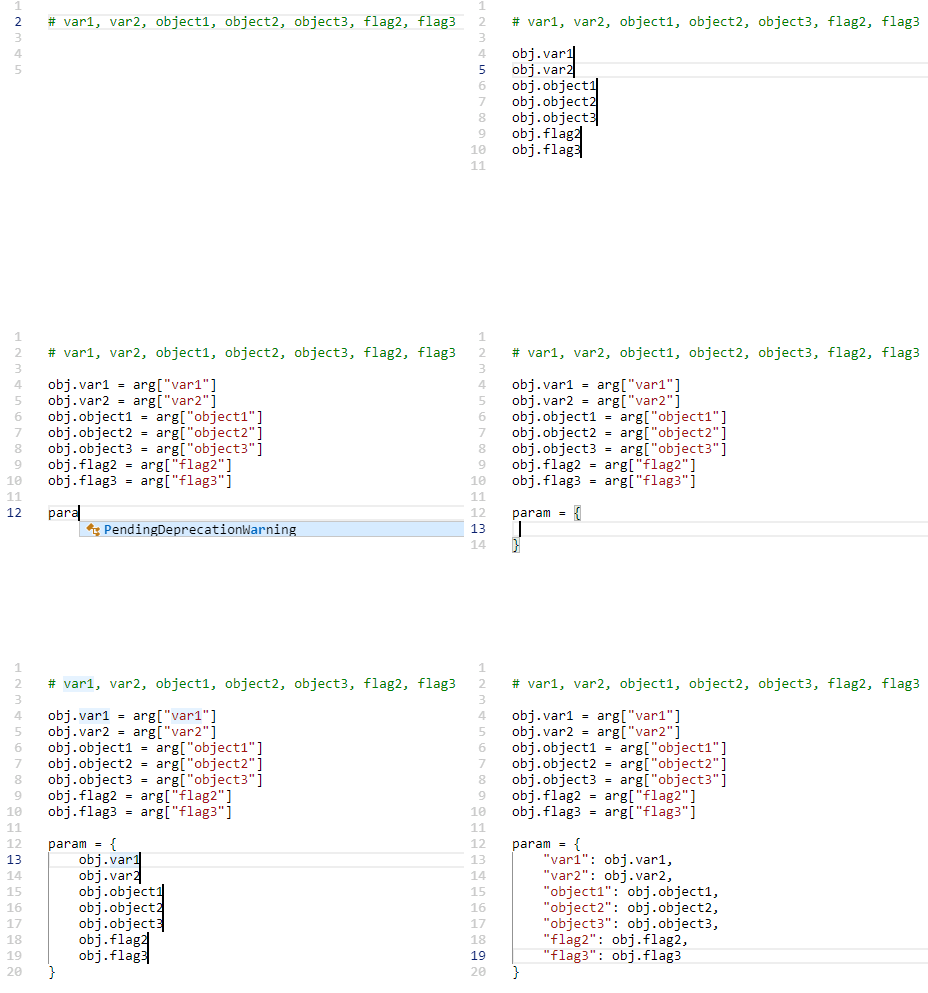
                      I found out a work-around to simulate the behavior of your animated gif picture !

                      I suppose 3 hypotheses :

                      • The Multi-Editing feature is enabled ( Settings > Preferences… > Editing > Multi-Editing settings )

                      • The BetterMultiSelection plugin is installed and enabled

                      • The Ctrl+ D shortcut is assigned to the Scintilla function SCI_SELECTION DUPLICATE ( and not to SCI_LINEDUPLICATE ! )


                      So, assuming this sample test, below , in a new tab :

                      var1, var2, object1, object2, object3, flag2, flag3
                      
                      • Place the cursor right before the string var1 ( without the Ctrl key pressed )

                      • Holding down a Ctrl key, left click, right in front of all the other strings, in order to get a total of 7 cursors !

                      Now :

                      • Backspace * 2

                      • Enter

                      You should get a 7- lines selection, below :

                      var1
                      var2
                      object1
                      object2
                      object3
                      flag2
                      flag3
                      

                      Note that the SP notation, below, represents a hit on the Space bar

                      • Type obj.

                      • Shift + End

                      • Ctrl + D

                      • Right

                      • Type SP=SParg["

                      • Shift + End

                      • Ctrl + D

                      • Right

                      • Type "]SP#SPDefinitionSPofSP

                      • Esc

                      You obtain the following text :

                      obj.var1 = arg["var1"] # Definition of var1
                      obj.var2 = arg["var2"] # Definition of var2
                      obj.object1 = arg["object1"] # Definition of object1
                      obj.object2 = arg["object2"] # Definition of object2
                      obj.object3 = arg["object3"] # Definition of object3
                      obj.flag2 = arg["flag2"] # Definition of flag2
                      obj.flag3 = arg["flag3"] # Definition of flag3
                      

                      Now, regarding the second block, we start, again, with the following text :

                      var1, var2, object1, object2, object3, flag2, flag3
                      
                      • Place the cursor right before the string var1 ( without the Ctrl key pressed )

                      • Holding down a Ctrl key, left click, right in front of all the other strings, in order to get a total of 7 cursors

                      Then :

                      • Backspace * 2

                      • Enter

                      Again , you’ll obtain the 7- lines selection, below :

                      var1
                      var2
                      object1
                      object2
                      object3
                      flag2
                      flag3
                      

                      Now :

                      • Tab

                      • Type "

                      • Shift + End

                      • Ctrl + D

                      • Right

                      • Type ":SPobj.

                      • End

                      • Type ,

                      • Esc

                      And… you get the expected text, with a leading tabulation :

                      	"var1": obj.var1,
                      	"var2": obj.var2,
                      	"object1": obj.object1,
                      	"object2": obj.object2,
                      	"object3": obj.object3,
                      	"flag2": obj.flag2,
                      	"flag3": obj.flag3,
                      

                      Cheers,

                      guy038

                      1 Reply Last reply Reply Quote 2
                      • cipher-1024C Offline
                        cipher-1024
                        last edited by

                        I don’t know HOW I missed @dali 's plugin for this long! I have to admit whenever I saw someone doing multiline work I was extremely jealous and tempted to try the VS Code waters. @guy038, what is your CTRL-D mapped to? CTRL-D is mapped to “Duplicate Current Line” for me. When I follow your instructions, I just get duplicate lines. If I try to copy and paste, the paste is just all of the selections globbed together. I can’t seem to duplicate just the selection (like it does in the gif on github). This is what I get when I follow your instructions:

                        	"var1": obj.,
                        	"var1
                        	"var2": obj.,
                        	"var2
                        	"object1": obj.,
                        	"object1
                        	"object2": obj.,
                        	"object2
                        	"object3": obj.,
                        	"object3
                        	"flag2": obj.,
                        	"flag2
                        	"flag3": obj.,
                        	"flag3
                        
                        1 Reply Last reply Reply Quote 2
                        • cipher-1024C Offline
                          cipher-1024
                          last edited by cipher-1024

                          Ohh you rascals! I went into the shortcut mapper and under the Scintilla commands tab there was an unassigned “SCI_SELECTIONDUPLICATE”. I assigned that to Ctrl + D et voila! (as Guy would say)!

                          Christmas came early this year! Now I’m not the only kid on the block that can’t mulitedit! Thank you @dail and @guy038 for bringing this plugin to my attention!

                          1 Reply Last reply Reply Quote 2
                          • guy038G Offline
                            guy038
                            last edited by guy038

                            Hello, @cipher-1024, and All,

                            Yes, as you found it out yourself, my Ctrl+D shortcut is assigned to the Scintilla function SCI_SELECTIONDUPLICATE ( and not to SCI_LINEDUPLICATE ! )

                            So, I updated my previous post to add this statement to the hypotheses block !

                            Cheers,

                            guy038

                            1 Reply Last reply Reply Quote 3
                            • cipher-1024C Offline
                              cipher-1024
                              last edited by

                              Thanks Guy. I must have changed the default ages ago because I don’t remember doing it. Also a big thank you again to @dail. Now I don’t have to be all like this.

                              1 Reply Last reply Reply Quote 1
                              • bitagorasB Offline
                                bitagoras
                                last edited by

                                For your information: The newest version of the plugin “BetterMultiSelection” is now capable to do copy and paste on multiple cursors (as I used it in the VSCode animation above).

                                There is now only the one missing important feature to make multi editing as fast as in VSCode: the ctrl+D select function. Scintilla seems to support this feature as well, but it’s not available in Notepad++ for keyboard shortcut:

                                SCI_MULTIPLESELECTADDNEXT (in VSCode bound to ctrl-d)
                                SCI_MULTIPLESELECTADDEACH (in VSCode bound to shift-ctrl-l)

                                What ctrl-d does:
                                It selects the next occurence of the current selection as added multiselection. You can use it to very quickly rename variables. In Notepad++ you have to use the mouse, which is much slower, or the replace function. In VSCode there is also a “skip next occurence” (ctrl-k) and “undo last selection” (ctrl-u) which makes it very versatile.

                                EkopalypseE dinkumoilD 2 Replies Last reply Reply Quote 3
                                • EkopalypseE Offline
                                  Ekopalypse @bitagoras
                                  last edited by Ekopalypse

                                  @bitagoras said in Multi selection and multi edit:

                                  SCI_MULTIPLESELECTADDNEXT

                                  Added this feature request.

                                  1 Reply Last reply Reply Quote 3
                                  • dinkumoilD Offline
                                    dinkumoil @bitagoras
                                    last edited by dinkumoil

                                    @bitagoras

                                    About to one year ago we had a conversation about this topic here in the forum, have a look at this thread.

                                    The essentials of the discussion:

                                    1. You can already use these features using a scripting plugin.

                                    In the following I provide the code for the NppExec plugin.

                                    Command SCI_MULTIPLESELECTADDNEXT (with the help of @Ekopalypse):

                                    sci_sendmsg SCI_SETSEARCHFLAGS SCFIND_WHOLEWORD
                                    sci_sendmsg 2690  // SCI_TARGETWHOLEDOCUMENT
                                    sci_sendmsg 2688  // SCI_MULTIPLESELECTADDNEXT
                                    

                                    Command SCI_MULTIPLESELECTADDEACH (generously provided by @Ekopalypse):

                                    sci_sendmsg SCI_SETSEARCHFLAGS SCFIND_WHOLEWORD
                                    sci_sendmsg 2690  // SCI_TARGETWHOLEDOCUMENT
                                    
                                    sci_sendmsg SCI_GETSELECTIONEMPTY
                                    
                                    if $(MSG_RESULT) == 1 then
                                      sci_sendmsg 2688  // SCI_MULTIPLESELECTADDNEXT
                                     
                                    sci_sendmsg 2689  // SCI_MULTIPLESELECTADDEACH
                                    
                                    1. As these commands are not supported in Notepad++ versions older than v7.7, it is possible to emulate them using a scripting plugin. In the following I provide the Lua code (can be used in conjunction with the LuaScript plugin) to do this:

                                    Command SCI_MULTIPLESELECTADDNEXT (provided by @dail):

                                    -- =============================================================================
                                    -- Add menu entry to select next occurence of word under or next to cursor or
                                    -- already selected word
                                    -- =============================================================================
                                    
                                    npp.AddShortcut("Selection Add Next", "", function()
                                      -- From SciTEBase.cxx
                                      local flags = SCFIND_WHOLEWORD -- can use 0
                                    
                                      editor:SetTargetRange(0, editor.TextLength)
                                      editor.SearchFlags = flags
                                    
                                      -- From Editor.cxx
                                      if editor.SelectionEmpty or not editor.MultipleSelection then
                                        local startWord = editor:WordStartPosition(editor.CurrentPos, true)
                                        local endWord   = editor:WordEndPosition(startWord, true)
                                    
                                        editor:SetSelection(startWord, endWord)
                                      else
                                        local i = editor.MainSelection
                                        local s = editor:textrange(editor.SelectionNStart[i], editor.SelectionNEnd[i])
                                        local searchRanges = {{editor.SelectionNEnd[i], editor.TargetEnd}, {editor.TargetStart, editor.SelectionNStart[i]}}
                                    
                                        for _, range in pairs(searchRanges) do
                                          editor:SetTargetRange(range[1], range[2])
                                    
                                          if editor:SearchInTarget(s) ~= -1 then
                                            editor:AddSelection(editor.TargetStart, editor.TargetEnd)
                                    
                                            -- To scroll main selection in sight
                                            editor:ScrollRange(editor.TargetStart, editor.TargetEnd)
                                    
                                            break
                                          end
                                        end
                                      end
                                    
                                      -- To turn on Notepad++ multi select markers
                                      editor:LineScroll(0, 1)
                                      editor:LineScroll(0, -1)
                                    end)
                                    

                                    Command SCI_MULTIPLESELECTADDEACH (devolped by myself by extending above script):

                                    -- =============================================================================
                                    -- Add menu entry to select all occurences of word under or next to cursor or
                                    -- already selected word
                                    -- =============================================================================
                                    
                                    npp.AddShortcut("Selection Add All", "", function()
                                      local flags     = SCFIND_WHOLEWORD -- can use 0
                                      local startWord = -1
                                      local endWord   = -1
                                      local s         = ""
                                    
                                      editor.SearchFlags = flags
                                    
                                      if editor.SelectionEmpty or not editor.MultipleSelection then
                                        startWord = editor:WordStartPosition(editor.CurrentPos, true)
                                        endWord   = editor:WordEndPosition(startWord, true)
                                    
                                        editor:SetSelection(startWord, endWord)
                                      else
                                        local i   = editor.MainSelection
                                    
                                        startWord = editor.SelectionNStart[i]
                                        endWord   = editor.SelectionNEnd[i]
                                      end
                                    
                                      s = editor:textrange(startWord, endWord)
                                    
                                      while true do
                                        editor:SetTargetRange(0, editor.TextLength)
                                    
                                        local i            = editor.MainSelection
                                        local searchRanges = {{editor.SelectionNEnd[i], editor.TargetEnd}, {editor.TargetStart, editor.SelectionNStart[i]}}
                                        local itemFound    = false
                                    
                                        for _, range in pairs(searchRanges) do
                                          editor:SetTargetRange(range[1], range[2])
                                    
                                          if editor:SearchInTarget(s) ~= -1 then
                                            editor:AddSelection(editor.TargetStart, editor.TargetEnd)
                                            itemFound = true
                                            break
                                          end
                                        end
                                    
                                        if editor.TargetStart == startWord and
                                           editor.TargetEnd   == endWord   or
                                           not itemFound                   then
                                          break
                                        end
                                      end
                                    
                                      -- To turn on Notepad++ multi select markers
                                      editor:LineScroll(0, 1)
                                      editor:LineScroll(0, -1)
                                    end)
                                    
                                    bitagorasB 1 Reply Last reply Reply Quote 4
                                    • bitagorasB Offline
                                      bitagoras @dinkumoil
                                      last edited by

                                      @dinkumoil : Ok thank you, I was not aware. But I still would appreaciate if the two functions would be added to list of scintilla comands at the keyboard shortcuts. Should not be to difficult.

                                      EkopalypseE 1 Reply Last reply Reply Quote 1
                                      • EkopalypseE Offline
                                        Ekopalypse @bitagoras
                                        last edited by

                                        @bitagoras
                                        I just have updated the FR with my test.
                                        A simple keyboard binding does not work but the solution is
                                        similar easy.

                                        1 Reply Last reply Reply Quote 0
                                        • bitagorasB Offline
                                          bitagoras
                                          last edited by

                                          Here is my entire solution (copy from this Github Issue) with NppExec which gives Notepad++ all the multi editing functionality from VSCode. The only difference is that there are two different shortcuts each for addNext and for skip.

                                          addNext (Ctrl-D):

                                          NPP_CONSOLE 0
                                          sci_sendmsg 2690  // SCI_TARGETWHOLEDOCUMENT
                                          sci_sendmsg SCI_SETSEARCHFLAGS 0
                                          sci_sendmsg 2688  // SCI_MULTIPLESELECTADDNEXT
                                          

                                          multiSelect_D

                                          addNextWholeWord (Shift-Ctrl-D):

                                          NPP_CONSOLE 0
                                          sci_sendmsg 2690  // SCI_TARGETWHOLEDOCUMENT
                                          sci_sendmsg SCI_SETSEARCHFLAGS SCFIND_WHOLEWORD
                                          sci_sendmsg 2688  // SCI_MULTIPLESELECTADDNEXT
                                          

                                          multiSelect_DW

                                          addEach (Shift-Ctrl-L):

                                          NPP_CONSOLE 0
                                          sci_sendmsg 2690  // SCI_TARGETWHOLEDOCUMENT
                                          sci_sendmsg SCI_GETSELECTIONEMPTY
                                          if $(MSG_RESULT) == 1 then
                                            sci_sendmsg SCI_SETSEARCHFLAGS SCFIND_WHOLEWORD
                                          else
                                            sci_sendmsg SCI_SETSEARCHFLAGS 0
                                          endif
                                          sci_sendmsg 2689  // SCI_MULTIPLESELECTADDEACH
                                          sci_sendmsg 2689  // SCI_MULTIPLESELECTADDEACH
                                          

                                          multiSelect_EACH

                                          undoAddNext (Ctrl-U):

                                          NPP_CONSOLE 0
                                          sci_sendmsg SCI_GETSELECTIONS
                                          set n ~ $(MSG_RESULT) - 1
                                          sci_sendmsg SCI_DROPSELECTIONN $(n)
                                          

                                          multiSelect_DU

                                          skip (Alt-Ctrl-D):

                                          NPP_CONSOLE 0
                                          sci_sendmsg SCI_SETSEARCHFLAGS SCFIND_NONE
                                          sci_sendmsg 2688  // SCI_MULTIPLESELECTADDNEXT
                                          sci_sendmsg SCI_GETSELECTIONS
                                          set n ~ $(MSG_RESULT) - 2
                                          sci_sendmsg SCI_DROPSELECTIONN $(n)
                                          

                                          multiSelect_DS

                                          skipWholeWord (Alt-Shift-Ctrl-D):

                                          NPP_CONSOLE 0
                                          sci_sendmsg SCI_SETSEARCHFLAGS SCFIND_NONE
                                          sci_sendmsg 2688  // SCI_MULTIPLESELECTADDNEXT
                                          sci_sendmsg SCI_GETSELECTIONS
                                          set n ~ $(MSG_RESULT) - 2
                                          sci_sendmsg SCI_DROPSELECTIONN $(n)
                                          
                                          Don BhaiD bitagorasB 2 Replies Last reply Reply Quote 6
                                          • michaelfernandez98M Offline
                                            michaelfernandez98
                                            last edited by

                                            Hello
                                            I’m new to this but I’m interested in having the functionality to select similar strings in a document and be able to do multiple editing
                                            how can i add this functionality to notepad ++?

                                            Alan KilbornA 1 Reply Last reply Reply Quote 0

                                            Hello! It looks like you're interested in this conversation, but you don't have an account yet.

                                            Getting fed up of having to scroll through the same posts each visit? When you register for an account, you'll always come back to exactly where you were before, and choose to be notified of new replies (either via email, or push notification). You'll also be able to save bookmarks and upvote posts to show your appreciation to other community members.

                                            With your input, this post could be even better 💗

                                            Register Login
                                            • First post
                                              Last post
                                            The Community of users of the Notepad++ text editor.
                                            Powered by NodeBB | Contributors



