How to delete text after the 2nd specific character in each row
-
Hi, @crimson-virtuoso, @alan-kilborn, @ekopalypse and All,
Alan, very informative post, indeed ! So, If I correctly understand what you said, this means that :
- If the test, on present line
1816of theFindReplaceDlg.cppfile, for a possible change of selection range, would have been absent, the\Kregex feature would work, while doing a single replace operation, with theReplacebutton ?
I backup your post’s link for future reference, if any question regarding the weird behavior of the
\Kfeature ;-))Best Regards,
guy0038
- If the test, on present line
-
Well, it wouldn’t be as simple as removing the indicated line, as that would break other functionality.
Truly, though, I haven’t thought too much about it.
While I can kinda read C++, and I can use the Visual Studio debugger to step through its code, it isn’t my strong suit.
Hmm, maybe I don’t have a “strong suit”. (Is that a known expression?)
I leave it to others, but I’m fairly confident in my analysis presented earlier about this; I spent a bit of time single-stepping through it and looking at it. -
@Ekopalypse said in How to delete text after the 2nd specific character in each row:
You can use find to jump through the matches but you cannot use
replace while doing this.I can’t think of any better.
It would be better to replace “^” with “\A”.^((\w+ \| ){2})(.+) \1 -
@Pan-Jan said in How to delete text after the 2nd specific character in each row:
I can’t think of any better.
It would be better to replace “^” with “\A”.Why do you think so? What is the advantage of using
\Ainstead of^in this case? -
If I wanted to swap lines one by one
the pattern works from the cursor position. -
the pattern works from the cursor position.
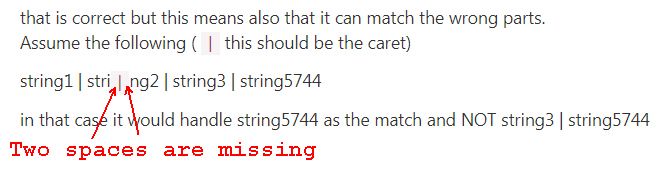
that is correct but this means also that it can match the wrong parts.
Assume the following (|this should be the caret)string1 | stri
|ng2 | string3 | string5744in that case it would handle string5744 as the match and NOT string3 | string5744
-
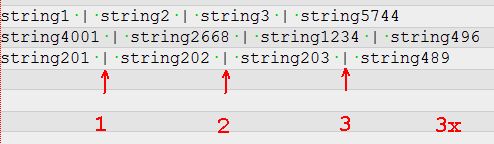
@Crimson-Virtuoso said in How to delete text after the 2nd specific character in each row:
string1 | string2 | string3 | string5744
string4001 | string2668 | string1234 | string496
string201 | string202 | string203 | string489in this example there are 3 x |
-
I’m sorry, but I think I’m out.
If you think you’re gonna get anywhere with the way you communicate, good luck with that.
I won’t waste any more time trying to figure out what you might mean. -
-
^((\w+ \| ){2})(.+)can be replaced individually




Hello! It looks like you're interested in this conversation, but you don't have an account yet.
Getting fed up of having to scroll through the same posts each visit? When you register for an account, you'll always come back to exactly where you were before, and choose to be notified of new replies (either via email, or push notification). You'll also be able to save bookmarks and upvote posts to show your appreciation to other community members.
With your input, this post could be even better 💗
Register Login