Strange blank panels boxing in the editor
-
Hi All,
This is a fresh install of Notepad++ - after I ensured that
%AppData%\Notepad++\was removed after un-installing the previous version.When I first open it , it seemed OK, but any time I open a new file the view goes like this:
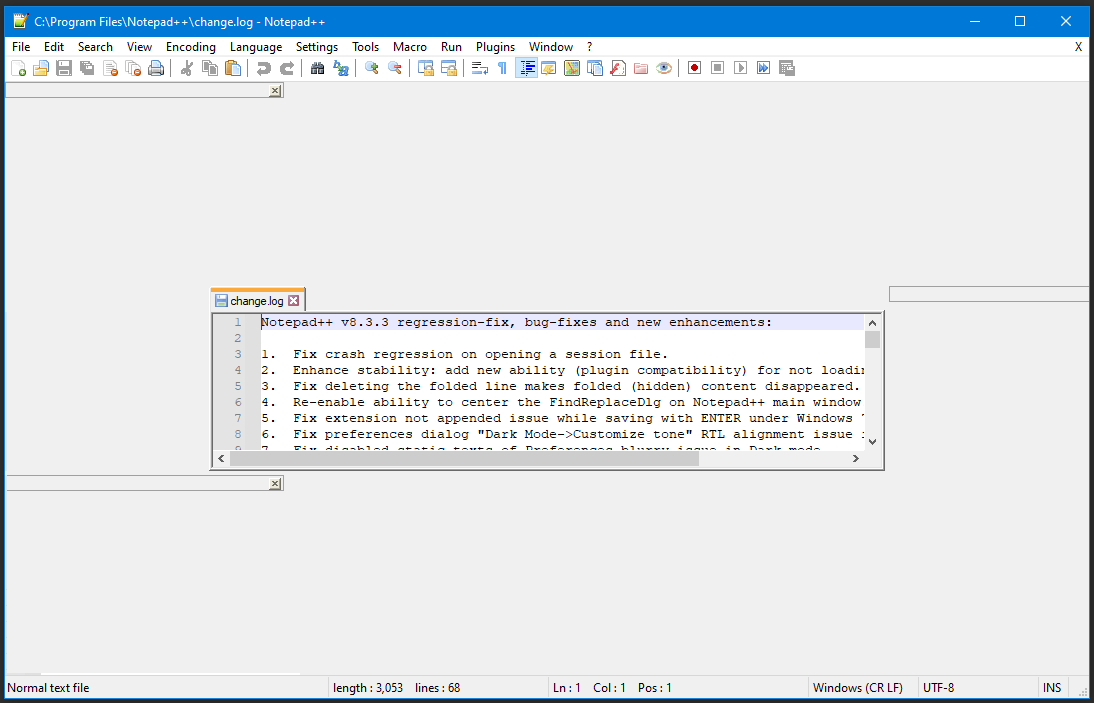
Since this is a fresh install with app data removed, it’s not a plugin issue right?
Rob
:) -
People have encountered this problem and have found workarounds/fixes:
https://community.notepad-plus-plus.org/topic/20996/tabs-are-floating-after-upgrade-to-7-9-5
https://community.notepad-plus-plus.org/topic/20997/odd-margins-around-window
https://community.notepad-plus-plus.org/topic/21056/window-layout-problems-after-update
https://community.notepad-plus-plus.org/topic/22371/messed-up-layout -
@neil-schipper thank you, that helped. Managed to close Slack, re-size the editor window and the issue has gone away for now.
-
@robert-mark-bram Good. I also should have mentioned that (reporting back on your experience is a good idea – which you already realized – but also, when doing so) it’s helpful to include a dump of the Debug info, accessed off the ? item on the main menu.


Hello! It looks like you're interested in this conversation, but you don't have an account yet.
Getting fed up of having to scroll through the same posts each visit? When you register for an account, you'll always come back to exactly where you were before, and choose to be notified of new replies (either via email, or push notification). You'll also be able to save bookmarks and upvote posts to show your appreciation to other community members.
With your input, this post could be even better 💗
Register Login