HELP!!! Multiple context menu entries
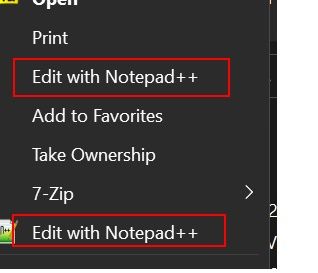
-
@Nandini-CD
Hey!
You sound like panicking :)
https://community.notepad-plus-plus.org/topic/21965/please-read-this-before-postingThere’s something there about debug info… and probably other things.
-
Aside from that, I’d look at what’s the version and location of Notepad++ when you open files with each of those context entries. Thus, debug info from N++ of each.
-
See also https://community.notepad-plus-plus.org/topic/24777/windows-11-contextmenu
addendum: Actually, I’ve thought of a possible easy-to-fix culprit, but I’ll need you to share your Debug Info like @Victorel-Petrovich requested – the Debug Info is in the ? menu in Notepad++. With that information, I’ll be able to frame a suggestion / request for more information without having to make assumptions about your setup.
-
@Victorel-Petrovich thank you for sharing the link for how to post. here is the debug info. please let me know anything else you require to fix this.
Notepad++ v8.5 (64-bit)
Build time : Mar 6 2023 - 02:18:13
Path : C:\Program Files\Notepad++\notepad++.exe
Command Line :
Admin mode : OFF
Local Conf mode : OFF
Cloud Config : OFF
OS Name : Windows 11 Pro (64-bit)
OS Version : 22H2
OS Build : 22621.525
Current ANSI codepage : 1252
Plugins :
mimeTools (2.9)
NppConverter (4.5)
NppExport (0.4) -
@Victorel-Petrovich sure, here it is:
Notepad++ v8.5 (64-bit)
Build time : Mar 6 2023 - 02:18:13
Path : C:\Program Files\Notepad++\notepad++.exe
Command Line :
Admin mode : OFF
Local Conf mode : OFF
Cloud Config : OFF
OS Name : Windows 11 Pro (64-bit)
OS Version : 22H2
OS Build : 22621.525
Current ANSI codepage : 1252
Plugins :
mimeTools (2.9)
NppConverter (4.5)
NppExport (0.4) -
@Nandini-CD said in HELP!!! Multiple context menu entries:
Notepad++ v8.5 (64-bit)
There have been
56 releases of Notepad++ since that version. The right-click context menu has been improved in the intervening versions, though I’m not sure if it will get rid of your double-entry or not. But until you upgrade to at least v8.5.4 (the most recent version available in ?-menu’s Update Notepad++ action) orv8.5.5v8.5.6 (which has been announced/released, but hasn’t triggered auto-update yet), we cannot know if your particular problem has already been fixed. (update: critical v8.5.5-bug was fixed in v8.5.6, so changed links to that version; v8.5.5 not recommended)If updating does not fix your problem, please open a cmd.exe window in the
c:\program files\notepad++\directory and rundir /Sand paste the results of that command into your reply. -
@Nandini-CD
I would first fully Uninstall current N++ , then, as Peter says, install latest version https://notepad-plus-plus.org/downloads/; if no help - his other tip. -
@PeterJones ok so what i understood is I have to update to latest version and see how it behaves. else run the cmd command and share the results
-
@PeterJones Thank you for sharing this. This fixed both the issues.
-
@Victorel-Petrovich Thank you for sharing this. I uninstalled the current version and downloaded the latest version and This fixed both the issues.


Hello! It looks like you're interested in this conversation, but you don't have an account yet.
Getting fed up of having to scroll through the same posts each visit? When you register for an account, you'll always come back to exactly where you were before, and choose to be notified of new replies (either via email, or push notification). You'll also be able to save bookmarks and upvote posts to show your appreciation to other community members.
With your input, this post could be even better 💗
Register Login