can't find words with search in files
-
I try to find words in a docx file, but have 0 results. I think my search parameters are OK:
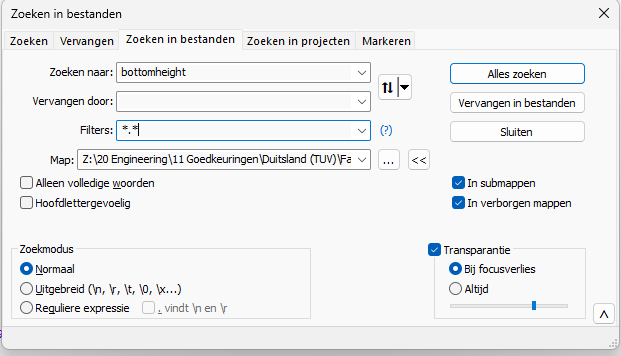
I deleted already the config.xml, but it doesn’t work. The same to my collegue
The result for a small word is some strange code where the word is found:

what could be wrong?
Notepad++ v8.8.7 (64-bit)
Build time: Oct 19 2025 - 16:19:15
Scintilla/Lexilla included: 5.5.7/5.4.5
Boost Regex included: 1_85
Path: C:\Program Files\Notepad++\notepad++.exe
Command Line: “C:\Users\RK\AppData\Roaming\Notepad++\config.xml”
Admin mode: OFF
Local Conf mode: OFF
Cloud Config: OFF
Periodic Backup: ON
Placeholders: OFF
Scintilla Rendering Mode: SC_TECHNOLOGY_DIRECTWRITE (1)
Multi-instance Mode: monoInst
asNotepad: OFF
File Status Auto-Detection: cdEnabledNew (for current file/tab only)
Dark Mode: OFF
Display Info:
primary monitor: 1920x1080, scaling 100%
visible monitors count: 1
installed Display Class adapters:
0000: Description - NVIDIA RTX A4000
0000: DriverVersion - 31.0.15.1740
0001: Description - Microsoft Remote Display Adapter
0001: DriverVersion - 10.0.26100.4484
0002: Description - Microsoft Remote Display Adapter
0002: DriverVersion - 10.0.26100.6725
0003: Description - Microsoft Remote Display Adapter
0003: DriverVersion - 10.0.26100.6725
- warning, search has been limited to maximum number of adapter records: 4
OS Name: Windows 11 Pro for Workstations (64-bit)
OS Version: 24H2
OS Build: 26100.6899
Current ANSI codepage: 1252
Plugins:
ComparePlugin (2.0.2)
mimeTools (3.1)
NppConverter (4.7)
NppExport (0.4)Thanks for help.
-
@Rick-Kosters said in can't find words with search in files:
what could be wrong?
See the FAQ: Why does my .docx file look like junk in Notepad++
-
@Rick-Kosters,
.docxfiles are compressed files, so unless you’re able to uncompress them first, you’ll never be able to use a third-party program to search them.For what it’s worth, 7-ZIP, Pkzip, WinZip, WinRAR, etc are all capable of opening those files. If you do unzip them, you’ll find a number of files and folders. What you’re looking for is most likely in
word\document.xml. -
@PecZXcterJones
Thanks, I understand.
-
You can try the free Agent Ransack utility from https://www.mythicsoft.com
It works with .doc, .docx and .pdf files too.




Hello! It looks like you're interested in this conversation, but you don't have an account yet.
Getting fed up of having to scroll through the same posts each visit? When you register for an account, you'll always come back to exactly where you were before, and choose to be notified of new replies (either via email, or push notification). You'll also be able to save bookmarks and upvote posts to show your appreciation to other community members.
With your input, this post could be even better 💗
Register Login