@Fermi said in Efficiently select/copy bookmarked lines and their collapsed contents altogether?:
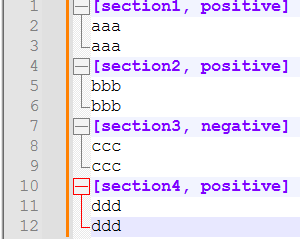
In a generic form (.ini), I want to select the header and its contents, where the header/comment before/after the keyword (ie. positive) are unique.
Ideally, regular expressions are constructed to match only the data you want it to match and will not match anything else. You don’t want false positives nor false negatives.
As you seem unwilling or unable to provide examples of the data you are attempting to match any help we provide here will also need to be generic or vague. To complicate things, you also seem to be shifting the goalposts of what a section header looks like.
I decided to define a section header as a line that starts with a [ and that anything else is not a section header line. With that in mind, here is a rather general regular expression that will match the positive sections:
(?-i)^\[.*[,;] *positive,.*\R(?:(?!\[).*\R)*
That expression has two main parts
(?-i)^\[.*[,;] *positive,.*\R matches the section header lines we are interested in.
(?:(?!\[).*\R)* matches zero or more lines that are not section header lines.
Reading the (?-i)^\[.*[,;] *positive,.*\R part from left to right we have:
(?-i) Turns off the ignore-case option so that we only match a lower case positive. If your data includes things such as Positive or POSITIVE then you should use (?i) instead of (?-i).
^ matches the start of a line,
\[ matches a [. We need the \ as [s have a special meaning within regular expressions. Using \[ says to look for a normal [.
.* matches zero to any number of characters.
[,;] matches either a comma or semicolon. When you first posted you had commas and now you have semicolons. That’s fine, we can handle either or both and so I went with both.
* matches zero to any number of spaces between the [,;] and the positive.
positive, matches the word positive followed by a comma.
.* matches zero to any number of characters. This will run to the end of the line.
\R matches the end of line characters themselves.
The second part with (?:(?!\[).*\R)* is slightly convoluted as I also want to match empty or blank lines and to include those in the section.
The (?: and )* outer parentheses and their decoration says to repeat the stuff that’s inside zero or more times.
(?!\[).*\R is the inner part and it matches any line that does not start with a [.