Community
    • Login
    1. Home
    2. Help wanted · · · – – – · · ·
    Log in to post
    Load new posts
    • Recently Replied
    • Recently Created
    • Most Posts
    • Most Votes
    • Most Views
    • wisemike2W

      How to make the Find box open in the same monitor?

      Watching Ignoring Scheduled Pinned Locked Moved
      6
      0 Votes
      6 Posts
      535 Views
      Alan KilbornA

      @Snabel42 said:

      potentially semi-transparent

      Yea, this has long been a feature of N++'s Find window, but it’s not a great solution IMO for how huge the Find window is.

    • Tom_1978T

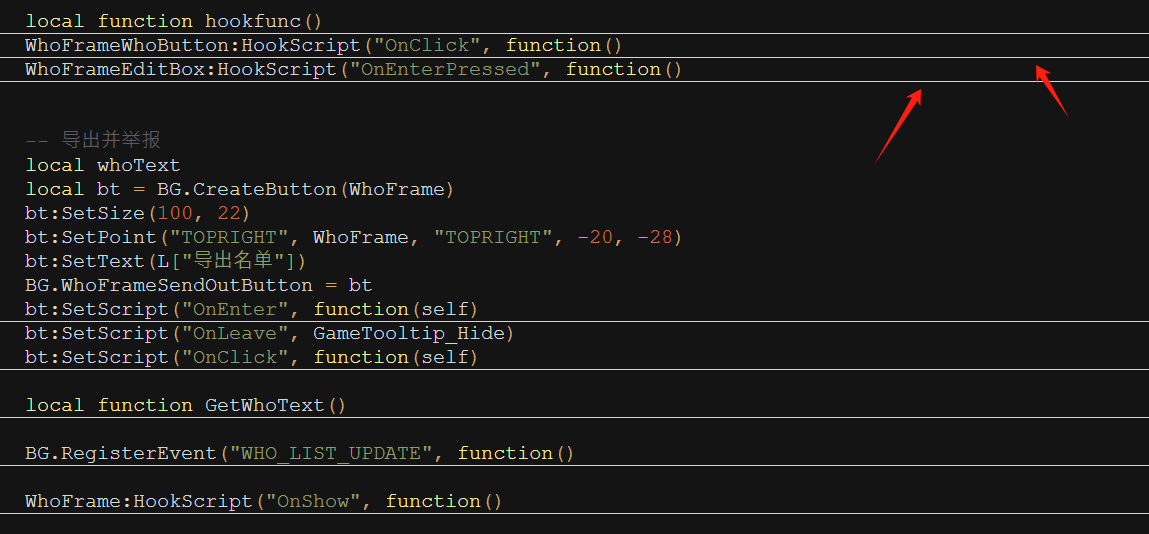
      regex in functionList/php.xml to display a specific comment in functionlist

      Watching Ignoring Scheduled Pinned Locked Moved
      5
      1 Votes
      5 Posts
      510 Views
      Tom_1978T

      @mpheath Your are a legend! Thanks. It works. :-)
      Unfortunately, my reputation is too low. That’s why I’m not allowed to give your post a positive vote.

    • Brixter TabunB

      How do I cancel column mode by moving the cursor?

      Watching Ignoring Scheduled Pinned Locked Moved
      2
      0 Votes
      2 Posts
      276 Views
      Alan KilbornA

      @Brixter-Tabun

      c7bb2870-9282-4b38-885f-65ae9d45adc9-image.png

    • Robert Or Janet DiebelR

      Adding more steps to an existing Macro

      Watching Ignoring Scheduled Pinned Locked Moved
      12
      0 Votes
      12 Posts
      4k Views
      Alan KilbornA

      @Robert-Or-Janet-Diebel said in Adding more steps to an existing Macro:

      Are comments allowed in shortcuts.xml?

      You can do this:

      <Action type="1" message="2172" wParam="0" lParam="0" sParam="I am a comment!!!!!!!!" />

    • Tom_1978T

      RegEx for functionlist/php.xml => Detection of a function for Showing in Functionlist

      Watching Ignoring Scheduled Pinned Locked Moved
      3
      0 Votes
      3 Posts
      364 Views
      PeterJonesP

      @Terry-R

      Sorry, I didn’t see it was a second copy when I approved the second.

      Conversation will continue in the other

    • Keith KrankerK

      Comment line style for user defined language

      Watching Ignoring Scheduled Pinned Locked Moved
      36
      0 Votes
      36 Posts
      35k Views
      malan sanniM

      @Scott-Sumner So you mean just change the name?

    • S

      Link to Edit with Notepad++ status/fix please

      Watching Ignoring Scheduled Pinned Locked Moved
      5
      0 Votes
      5 Posts
      2k Views
      S

      @PeterJones Yes, the paths were accurate. I have Notepad++ installed on a secondary drive with %APPDATA% path turned off - if you recall that install option. I tried installing on the default drive/path to no avail. I have added the PATH in my Environment settings to the dll’s and app just in case as well.

      I wish there was a way to compare registries just for Notepadd++ with you. I’m glad it works for you, hopefully another method will present itself here. Thank you.

    • L

      Can't decode byte 0x89 in position 0: ordinal not in range(128)

      Watching Ignoring Scheduled Pinned Locked Moved
      4
      0 Votes
      4 Posts
      586 Views
      Mark OlsonM

      Don’t use editor.getText with binary files. Notepad++ treats the file’s text as a NUL-terminated string for the purposes of that command, and most other text-retrieving commands. Apparently there are some ways for a plugin to get around this, but they are undoubtedly much more arcane.

      Have I ever mentioned how irritated I am that Don Ho refuses to implement a system for warning people that NPP is an inappropriate app for working with binary files?

    • afk afkA

      Open file to most recent edit

      Watching Ignoring Scheduled Pinned Locked Moved
      2
      0 Votes
      2 Posts
      279 Views
      PeterJonesP

      @afk-afk ,

      The closest command line option is -n# to take you to a specific line. If you pick a number that’s more than the number of lines (like -n999999), then it will scroll to the end.

    • I

      How to style URL?

      Watching Ignoring Scheduled Pinned Locked Moved
      4
      0 Votes
      4 Posts
      868 Views
      I

      @IstvanZachar Issued a feature request for styling URL-s here.

    • Dog five meD

      plugin admin not appearing

      Watching Ignoring Scheduled Pinned Locked Moved plugin-admin
      5
      0 Votes
      5 Posts
      9k Views
      Dog five meD

      @PeterJones @Terry-R
      i opened notepad++ to do some coding for my website and tyo get the rest of the debug info and suddenly my notepad++ decided to work properly and have all the missing things appear i haven’t done anything. so sorry for wasting everybody’s time

    • S

      [8.7.1] File doesn't open expected file in list

      Watching Ignoring Scheduled Pinned Locked Moved
      10
      0 Votes
      10 Posts
      688 Views
      xomxX

      @Alan-Kilborn said in [8.7.1] File doesn't open expected file in list:

      In this case, even though files are being closed, they aren’t saved in the “recent files” list. There must be something in the code that prevents this from happening during closure via shutdown.

      https://github.com/notepad-plus-plus/notepad-plus-plus/blob/de1a04038b45df4e25f81f8bef1008b5a978106d/PowerEditor/src/NppBigSwitch.cpp#L2694

    • John 0J

      File does not exist.

      Watching Ignoring Scheduled Pinned Locked Moved
      11
      0 Votes
      11 Posts
      2k Views
      Mark OlsonM

      BTW my HugeFiles plugin is more feature-rich and actively maintained than BigFiles.

    • mohammad Al-MaaitahM

      How to remove this symbols from txt file

      Watching Ignoring Scheduled Pinned Locked Moved
      10
      0 Votes
      10 Posts
      5k Views
      dr ramaanandD

      @mohammad-Al-Maaitah if your first and last symbol is symbol.PNGyou can type \x16.*?\x16 in the Find field, tick the regular expression mode, leave the Replace field empty and click Replace in files (to remove it from multiple files). That will help you get rid of all of those (and anything else in between). There are no spaces anywhere in the middle, so I am explaining the same to you

    • M

      Can't find and replace text within multiple quotations

      Watching Ignoring Scheduled Pinned Locked Moved
      6
      0 Votes
      6 Posts
      575 Views
      PeterJonesP

      Moderator restored the original post.

      Deleting a post after there have been replies is highly discouraged. There is nothing sensitive in the original post, so the post has been restored to maintain the history of this conversation:

      Don’t be embarrassed about having figured out the real problem: in internet help forums, there’s a whole category called “rubber duck debugging”, wherein just explaining the problem to someone else (ie, making your post) is enough to nudge your mind in the right direction, even without a reply – it’s nothing to be ashamed of. And thanks for letting us know you figured out your problem (so many times, people just go away after figuring it out, and never tell us whether we helped or whether we just acted as the rubber duck).

    • Pj DoyleP

      figuring how to create multiple pages on html for website

      Watching Ignoring Scheduled Pinned Locked Moved
      2
      0 Votes
      2 Posts
      1k Views
      Terry RT

      @Pj-Doyle
      Your question seems to be related to html code and websites. Possibly you are using Notepad++ to generate this code, but as the issue isn’t really a Notepad++ issue you need to go to a HTML forum to get the answer.

      Can I refer you to this FAQ post here.

      Terry

    • Alessandro PaceA

      Search/Replace to delete between two words

      Watching Ignoring Scheduled Pinned Locked Moved search & replace large file replace all expression date & time - s
      5
      1 Votes
      5 Posts
      755 Views
      Alessandro PaceA

      @PeterJones Thank you so much these all worked perfectly!!

    • Milo VirM

      Add number in each line

      Watching Ignoring Scheduled Pinned Locked Moved
      8
      0 Votes
      8 Posts
      3k Views
      Alan KilbornA

      @dr-ramaanand said in Add number in each line:

      please explain how to use the above RegEx

      I think the “explain” part was already done.
      But it isn’t a “RegEx”; it’s a syntax peculiar to the MutliReplace plugin.

    • Alberto CasanovaA

      Is there anyway to modify "Function List" font style and size?

      Watching Ignoring Scheduled Pinned Locked Moved
      4
      1 Votes
      4 Posts
      461 Views
      PeterJonesP

      @Alberto-Casanova said in Is there anyway to modify "Function List" font style and size?:

      Maybe a mod or a plugin?

      I don’t think there is a way for a plugin to influence the font in a Notepad++-built-in panel.

      I’m not a plugin author, so I’m not sure; but as I’ve documented the plugin-communication messages, there isn’t a message which affects the font in that panel. However, there might be a clever programming trick that I’m not aware of to hack something like that. Someone with more plugin experience than I have would have to chime in.

    • Sandeep SS

      Pinning of files on Notepad ++

      Watching Ignoring Scheduled Pinned Locked Moved
      6
      1 Votes
      6 Posts
      2k Views
      Alan KilbornA

      @Sandeep-S

      …and I have recommended that issue be CLOSED, mainly because this idea was not taken up:

      supply some concrete ideas for change

      The suggestion made in the issue was for a way to disable the feature, not “pinning in a different way”.

    The Community of users of the Notepad++ text editor.
    Powered by NodeBB | Contributors