• [New Plugin] MarkdownViewer++

    html plugin pdf markdown
    25
    6 Votes
    25 Posts
    54k Views
    Michael VincentM
    @Michael-Vincent ALCON: I’ve seen a more recently maintained version: https://github.com/UrsineRaven/NppMarkdownPanel to which I’ve submitted a pull request to fix the auto-refresh while typing and make the auto-scrolling not so severe. You can find my version at: https://github.com/vinsworldcom/NppMarkdownPanel NOTE: “My” version is completely UNSUPPORTED and only there as a repo for a pull request to someone else’s work. Cheers.
  • NotepadStarter 2.3.3.0 release for installing in new version notepad++

    6
    0 Votes
    6 Posts
    1k Views
    Alan KilbornA
    @lygstate I didn’t say it was simple. Maybe I misunderstand, which may be the case for others as well, so I’ll keep this going. So you start up Notepad++ and it loads this plugin. Then if you do things on your PC that would normally fire up Notepad.exe, it will instead switch to Notepad++ and do whatever it was going to do, in a Notepad++ tab? I’ve seen registry edits that do this on a permanent basis. And Notepad++ has some builtins to be run as a “Notepad.exe replacement”. But I just wonder about the use-cases for having a plugin sitting there watching for this kind of thing, while Notepad++ is already running. Maybe I just miss the point.
  • Can someone convert the Horizontal Ruler Plugin to 64 bit, please?

    8
    1 Votes
    8 Posts
    5k Views
    Slithy ToveS
    NOTEPAD++ 32 & 64 BIT HORIZONTAL RULER PLUGIN
  • How to compare two files that have only numbers?

    numbers
    8
    0 Votes
    8 Posts
    2k Views
    Makwana PrahladM
    Hello ,@FQVBSina Folllow thia step,To How to compare two files that have only numbers? Step 1 :- Install Compare plugin Step 1 :-Open Notepad++ and Click on the ‘Plugins’ then ‘Plugins Admin’ Step 2 :-A list of available plugins will appear Step 3 :-TIP: if the list is empty you need to check your Internet connection or proxy settings. Step 4:- Either search or scroll until you see ‘Compare’ Step 5:- Place a tick next to the name then click on the ‘Install’ button Step 6 :- Once the plugin is installed you will be prompted to restart Notepad++ Step 7 :- Click ‘Yes’ to finish the install. Step 2: Compare two files using Notepad++ Compare plugin Step 1 :- Now that the Compare plugin has been installed, open two files Step 2 :- Click on the ‘Plugins’ menu then ‘Compare’ and ‘Compare’ again Step 3 :- The files will be displayed, side by side, with the differences highlighted Step 4 :- It helps to keep the ‘old’ copy of your file on the left and the ‘new’ on the right – this should help with understanding how the plugin shows the difference between files. I hope this information will be usefull. Thank you.
  • C# plugins share AppDomain?

    4
    0 Votes
    4 Posts
    1k Views
    moon6969M
    Thanks both. I’ve not much idea myself about AppDomains, but I am swatting up. I’m also learning about Managed Extensibility Framework (MEF) and Managed AddIn Framework (MAF) to see if they can help. @Makwana-Prahlad Thanks for the example - easier for me than theory sometimes!
  • 0 Votes
    2 Posts
    499 Views
    Alan KilbornA
    @Tequiller You might want to do some “light reading” in the following areas: https://github.com/notepad-plus-plus/notepad-plus-plus/issues/1889 https://github.com/notepad-plus-plus/notepad-plus-plus/issues/2072 https://github.com/notepad-plus-plus/notepad-plus-plus/issues/3068 https://github.com/notepad-plus-plus/notepad-plus-plus/issues/4131 https://github.com/notepad-plus-plus/notepad-plus-plus/issues/4229 https://github.com/notepad-plus-plus/notepad-plus-plus/pull/4151
  • [update] Pluginpack updated to v0.92.76

    4
    0 Votes
    4 Posts
    4k Views
    DGutierrez3D
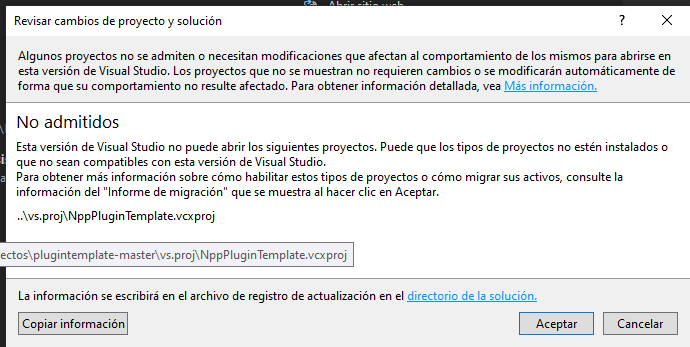
    Hello Kasper, I would like to ask you if you can tell me how to continue. https://stackoverflow.com/questions/61197067/plugin-for-notepad-with-visual-studio-code-c-sharp-error-msb4062 I have been trying for some time to develop a Plugin for N++ but I cannot compile the project. Could you help my? Regards
  • Gmod Lua Lexer is not compatible with newer versions of Notepad ++

    3
    0 Votes
    3 Posts
    4k Views
    владус . playВ
    @micmou Maybe for him too late you helped me very much thanks bro
  • Help with the Gmod lua lexer plugin

    1
    0 Votes
    1 Posts
    460 Views
    No one has replied
  • HTML+SVG syntax highlighting

    2
    0 Votes
    2 Posts
    3k Views
    PeterJonesP
    Was there a question someplace? Or were you offering a feature suggestion? Or were you just showing the way you tweaked the HTML language keywords in your langs.xml and were suggesting that other people do the same?
  • Normal Text as default language

    4
    0 Votes
    4 Posts
    5k Views
    D VisserD
    @PeterJones Thank You Peter; works ! David Visser
  • Problem with Hexa editor add-on

    3
    1
    0 Votes
    3 Posts
    2k Views
    cédric freycenonC
    Thanks for your answer. best regards Cédric Freycenon
  • language select on notepad launch

    9
    0 Votes
    9 Posts
    2k Views
    lubysjL
    @Ekopalypse , thanks. I will need to dig a bit to get a around.
  • Compare Plugin v2.0 updated for Notepad 7.7 and above

    37
    10 Votes
    37 Posts
    49k Views
    pnedevP
    @Robert-Werner , Read here: https://github.com/pnedev/compare-plugin/issues/225 BR
  • Notepad++ Language List

    7
    2 Votes
    7 Posts
    2k Views
    Michael VincentM
    @Michael-Vincent said in Notepad++ Language List: I may “borrow” that :-) @dinkumoil It’s in Pascal! argh! I converted your recommendation into C++ (i think): TCHAR langName[MAX_PATH]; lang_menu.clear(); do { SendMessage( nppData._nppHandle, NPPM_GETLANGUAGENAME, i, ( LPARAM ) langName ); lang_menu.push_back( wstrtostr( langName )); i++; } while ( strcmp( wstrtostr( langName ).c_str(), "External" ) != 0 ); lang_menu.push_back( "GLOBAL" ); This way no dependence on L_EXTERNAL or the Notepad_plus_msgs.h file. Thanks for taking the time to recommend that! Cheers.
  • Plugin bug report: "BookmarksDook" disables "Session Snapshot"

    1
    0 Votes
    1 Posts
    627 Views
    No one has replied
  • problem by test my plugin with pluginmanager

    2
    0 Votes
    2 Posts
    576 Views
    MarioRosiM
    … okay solution is found … The setup-zip only include the file for “Notepad++/plugin/MYPLUGINNAME/.*”-files. Not into subdir, but direct in root! On Github create an “release” with versionnumber and desription. Put in the setup-zip. Now can install the plugin over pluginmanager. regards Mario
  • Howto close current file / editor witout savequestion

    10
    1 Votes
    10 Posts
    2k Views
    MarioRosiM
    @ all i have found a solution: IScintillaGateway editor = new ScintillaGateway(PluginBase.GetCurrentScintilla()); editor.SetSavePoint(); Win32.SendMessage(PluginBase.nppData._nppHandle, (uint)NppMsg.NPPM_MENUCOMMAND, 0, NppMenuCmd.IDM_FILE_CLOSE); work wit current tab. thanks for inspiration
  • My plugin is not working with newer versions

    3
    0 Votes
    3 Posts
    613 Views
    pnedevP
    @Roy-Messi , Your plugin’s DLL needs to be located in Notepad++_install_folder\plugins\YourPluginName\YourPluginName.dll Check if it is there.
  • Plug-in (multiline find and replace) in 7.8.4 version

    4
    0 Votes
    4 Posts
    728 Views
    anisere yinkaA
    @gurikbal-singh thanks so much really appreciate. Can I get your direct mail for further inquiry, am just new