• Russian Translation

    43
    0 Votes
    43 Posts
    66k Views
    Alan KilbornA

    @guy038 said in Russian Translation:

    Personally, I think that the exact meaning of this option, in English should be :
    Dot (.) matches ‘End of Line’ chars, too

    The problem is, there is limited room on screen to display the text.

    I checked another regex program (RegexBuddy) and it uses Dot matches line breaks for this, which is longer than N++'s English text and shorter than Guy’s suggestion.

  • Turkish Special Chars "Canvert Case" is not working properly

    2
    0 Votes
    2 Posts
    6k Views
    EkopalypseE

    @mustafa-yildiz

    I’m not 100% sure, but I’m assuming Npp does a simple integer comparison. A simple test seems to confirm this.

    Alter altern Ärger ärgern 416c7465720d0a 616c7465726e0d0a c384726765720d0a c3a4726765726e

    Note, the 0d0a denotes the end of line characters.

    And to ask for a feature request, you have a better chance that this gets implemented if you open it herehere.

  • Translate NSIS installer for languages without a LCID

    3
    0 Votes
    3 Posts
    6k Views
    conky77C

    @peterjones
    I inserted the following ticket in NSIS’ feature request.
    https://sourceforge.net/p/nsis/feature-requests/564/

  • 3 Votes
    9 Posts
    9k Views
    sntgchnsS

    @guy038 thank you, I appreciate your help, I couldn’t do it even though I tried, the community will thank you

  • 0 Votes
    9 Posts
    6k Views
    sntgchnsS

    @astrosofista Thanks, its as you say man!

  • 0 Votes
    2 Posts
    2k Views
    PeterJonesP

    @inspiration-links

    Right click on the word that it thinks is misspelled, select Add XXX to Dictionary.

    ada36130-a99d-4896-a3d7-b87cb1f56a69-image.png
    =>
    88acbbd5-0b56-4a8c-9b6c-98fe497d5516-image.png

  • \Please maximize the use of Indonesian in Notepad ++

    1
    0 Votes
    1 Posts
    1k Views
    No one has replied
  • Kurdish localization

    4
    1 Votes
    4 Posts
    2k Views
    balyozxaneB

    @PeterJones Thank you for your quick reply. I honestly wasn’t expecting a reply at all. I will work on the localization. Once done hopefully we can upload it for the community, as well. Just to make sure this is not a matter of preference of writing in different scripts, I want to clear some aspects. The Latin-script Kurdish is called Kurmanji or Northern Kurdish and the Arabic-script Kurdish is called Sorani or Central Kurdish. They are sometimes listed as dialects and sometimes as different languages. If and when the localization is done hopefully we can rename the language so as not to confuse other people.

  • Ayuda CHM en español latino.

    2
    0 Votes
    2 Posts
    2k Views
    PeterJonesP

    @Fred-Fredagrico ,

    Out of curiosity, did you translate the CHM that came with ancient versions of Notepad++? Or did you translate the new npp-user-manual.org website into Spanish, then compile it into a CHM file?

    I ask, because I cannot remember the last time CHM was included. And I don’t think a CHM or HTML manual has been distributed with Notepad++ since before v7.0 in 2016 (the most recent version I have with an HTML manual was v6.6.6). If you’re translating that, it’s extremely out of date.

    If, however, you’ve translated the npp-user-manual.org website and compiled it into CHM, I would be interesting to know that’s what you’ve done.


  • Add а Bashkir language to the app's localizations

    2
    0 Votes
    2 Posts
    945 Views
    PeterJonesP

    @Радмир-Чуриков said in Add а Bashkir language to the app's localizations:

    The Bashkir language is a regional language of Russia. It is native to about 2 million people. The official language of the Republic of Bashkortostan, which is part of Russia.

    If you know Bashkir, feel free to create the translation file and submit a PR to have it included in the next release. Or find someone who can help you with that.

    Otherwise, the developers cannot be expected to know of and be fluent enough in any possible language to provide a translation. The developers rely upon user support for the translations.

  • Irish translation review needed

    3
    0 Votes
    3 Posts
    2k Views
    donhoD

    Nice to hear it, @Seanán-Ó-Coistín.
    You can send Irish translation to me, or do a PR on https://github.com/notepad-plus-plus/notepad-plus-plus

    Thank you.

  • new localization in venetian

    4
    0 Votes
    4 Posts
    2k Views
    ?

    @gurikbal-singh said in new localization in venetian:

    @Matteo-Concato
    by an pull request at github https://github.com/notepad-plus-plus/notepad-plus-plus/pulls

    Can this be done for any language?

  • Please add Upper Sorbian and Lower Sorbian translations

    5
  • Label not translated

    3
    1 Votes
    3 Posts
    2k Views
    conky77C

    I opened the issue 8004

    I added also some translation problems with the Updater.

  • Korean translation PR review needed

    1
    0 Votes
    1 Posts
    743 Views
    No one has replied
  • Installer translation

    6
    0 Votes
    6 Posts
    7k Views
    Prahlad-Makwana4145P

    Hello, @a-polivanchuk

    Please follow these steps to install translation:

    Step 1:- Go to the Plugins menu.
    Step 2:- Inside Plugins menu select Plugin Manager.
    Step 3:- Inside Plugin Manager select Show Plugin Manager. Then open dialog box of plugin manager.
    Step 4:- Under the dialog box select Translate and click on Install button.

    Note :-
    After installed, access Translate from the Plugins menu. Under Translate menu you will get options like :

    Translate Selected :- (To translate selected text from source to destination language), Translate Selected (Reverse Preference) :- (To translate selected text for destination to source language), Translate Code Style Strings :- (To translate code style strings) and Change Language Preference :- (To change the source and destination language preferences)

    I hope above information will be useful for you.
    Thank you.

  • "Monospace font" traduit en français...

    11
    0 Votes
    11 Posts
    5k Views
    Sudeep TamrakarS

    HI Guys,

    I’ve found one website “Monospace Font Generator” . I hope this may help you.

  • Windows context menu Turkish

    Locked
    4
    0 Votes
    4 Posts
    12k Views
    andrecool-68A

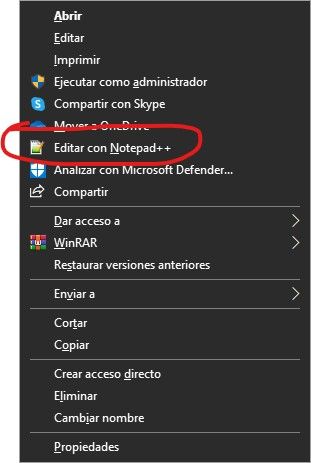
    Here is my registry file for adding an item to the context menu, the paths to the files naturally do not coincide with your paths (but this must be fixed). But note that I have a double slash in my file paths!

    Windows Registry Editor Version 5.00 [HKEY_CLASSES_ROOT\CLSID\{B298D29A-A6ED-11DE-BA8C-A68E55D89593}] @="ANotepad++64" [HKEY_CLASSES_ROOT\CLSID\{B298D29A-A6ED-11DE-BA8C-A68E55D89593}\InprocServer32] @="C:\\Users\\Uzeer\\Desktop\\npp.7.6.6\\x64\\NppShell_06.dll" "ThreadingModel"="Apartment" [HKEY_CLASSES_ROOT\CLSID\{B298D29A-A6ED-11DE-BA8C-A68E55D89593}\Settings] "Title"="Edit with &Notepad++" "Path"="C:\\Users\\Uzeer\\Desktop\\npp.7.6.6\\x64\\notepad++.exe" "Custom"="" "ShowIcon"=dword:00000001 "Dynamic"=dword:00000001 "Maxtext"=dword:00000019
  • Problems with german letters

    Locked
    2
    0 Votes
    2 Posts
    3k Views
    Meta ChuhM

    welcome to the notepad++ community, @Cesare-Pavin

    i think we might need more information.
    please go to ? > debug info... > copy debug info into clipboard and paste your debug information here, as all versions from 7.6 to 7.6.4 may eventually cause encoding problems.

    if you are on 7.6.6 or 7.5.9 and lower:

    open up any existing, working vbscript file with umlauts in windows notepad.exe and check if all umlauts are shown correctly.

    if they are, open this file in notepad++ and check if all umlauts are shown correctly.

    if your umlauts are shown correctly in notepad++ as well, go to the notepad++ menu encoding and check which encoding has a bullet.
    this will be your correct encoding. (usually either utf-8, ansi, or windows-1250) if your umlauts are not shown correctly, try to set another encoding from the encoding menu.
  • Czech translations

    11
    0 Votes
    11 Posts
    48k Views
    Elena HaritonovichE

    Notepad++ version 7.3.1 promote